
Focust 开发记录
Focust 是什么?
简而言之 Focust 是一个休息提醒软件,用以帮助用户在长时间工作后进行适当的休息。它的设计灵感来源于 Stretchly,不过添加了更多个性化和现代化的功能,并针对性地进行了性能优化。
具体就不介绍了,可以直接转到最新 README 查看,下面是一些图片演示(基于 v0.2.7):
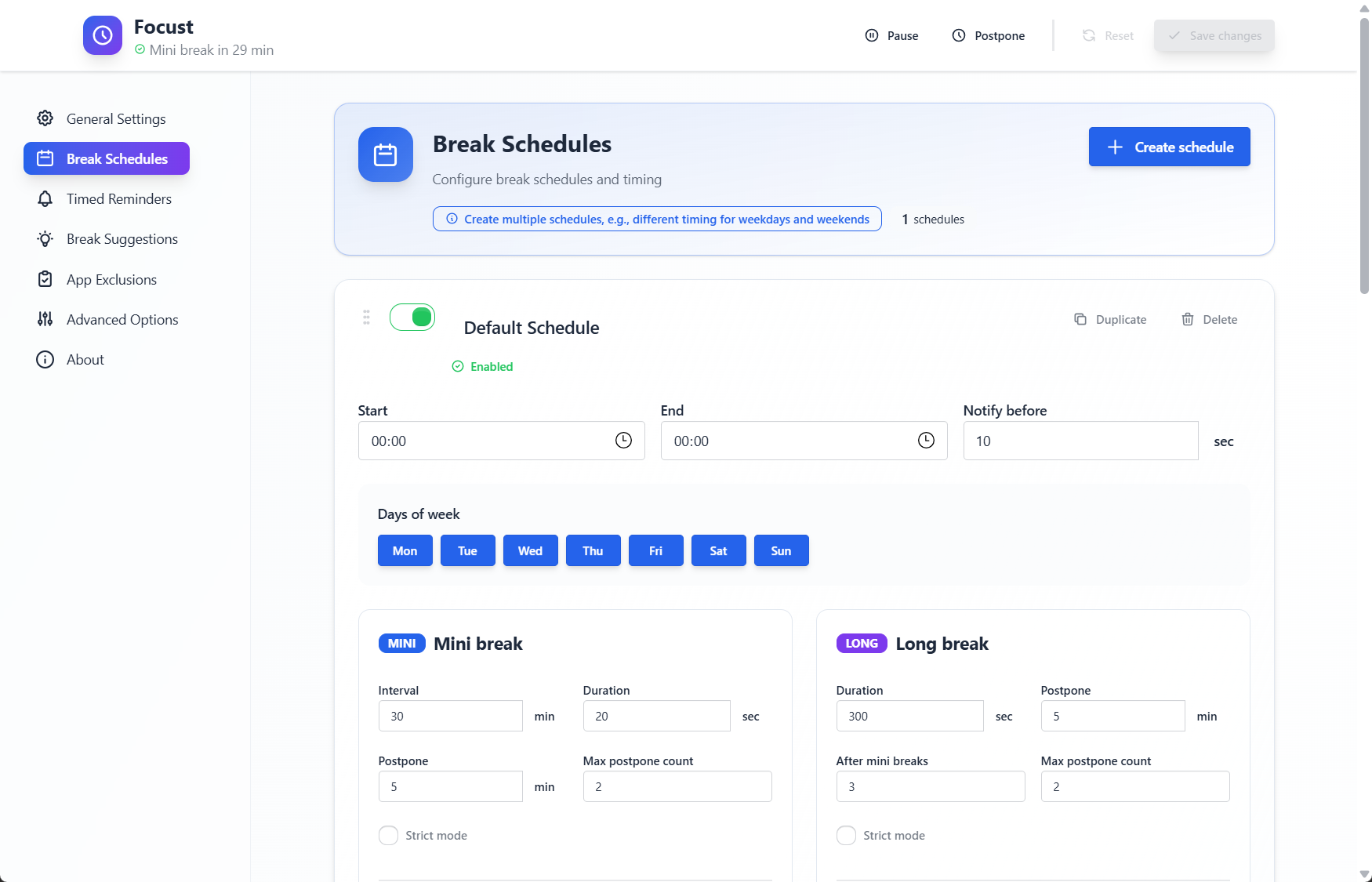


开发历程
下面的开发历程记录,如无特殊说明,若涉及到当前的代码,参照标准是 v0.2.7,即跟上面的图片一致,也是本文最初撰写的时间。
初始化
一开始确定了技术选型,前端采用 Vue3 + TypeScript + DaisyUI + TailwindCSS + Bun,后端采用 Rust。于是跟着官网创建项目:
$ bun create tauri-app |
然后前端还使用 Biome 作为代码格式化与检查工具,配置了 biome.json,这里复用了旧项目的配置。
基础数据结构
然后就是简单设计了一下数据结构,并实现了一些基础功能。
短休息和长休息基于一个 BaseBreakSettings 结构体,序列化时会将其展平,并有额外的字段:
1 2 3 4 5 6 7 8 9 10 11 12 13 14 15 16 17 18 19 20 21 22 23 24 25 26 | #[derive(Serialize, Deserialize, Debug, Clone)] pub struct BaseBreakSettings { pub id: BreakId, // Unique identifier for the break settings pub enabled: bool, // If the break is enabled pub theme: ThemeSettings, // Theme settings for the break pub audio: AudioSettings, // Audio settings for the break pub fullscreen: bool, // If the break should be shown in fullscreen pub ideas_source: IdeasSettings, // Ideas settings for the break pub duration_s: u64, // Duration of the break in seconds pub postponed_s: u64, // Postponed time in seconds pub strict_mode: bool, // If the break should be strictly followed } #[derive(Serialize, Deserialize, Debug, Clone)] pub struct MiniBreakSettings { #[serde(flatten)] pub base: BaseBreakSettings, pub interval_s: u64, // Interval between mini breaks in seconds } #[derive(Serialize, Deserialize, Debug, Clone)] pub struct LongBreakSettings { #[serde(flatten)] pub base: BaseBreakSettings, pub after_mini_breaks: u8, // Number of mini breaks after which to trigger a long break } |
然后就有「计划设置」的概念:
1 2 3 4 5 6 7 8 9 10 11 | #[derive(Serialize, Deserialize, Debug, Clone)] pub struct ScheduleSettings { pub name: String, // Name of the schedule pub enabled: bool, // If the schedule is enabled pub time_range: TimeRange, // Time range for the schedule pub days_of_week: Vec<Weekday>, // Days of the week when the schedule is active pub notification_before_s: u64, // Notification time in seconds before breaks pub mini_breaks: MiniBreakSettings, // Settings for mini breaks pub long_breaks: LongBreakSettings, // Settings for long breaks } |
注意提醒(Attention)也是类似。
上面的设置中出现了 BreakId 与 AttentionId,它们其实是原子计数器生成的唯一 ID:
1 2 3 4 5 6 7 8 9 10 11 12 13 14 15 16 17 18 19 20 | static NEXT_SCHEDULE_ID: AtomicUsize = AtomicUsize::new(0); static NEXT_ATTENTION_ID: AtomicUsize = AtomicUsize::new(0); #[derive(Serialize, Deserialize, Debug, Clone, Copy, PartialEq, Eq, PartialOrd, Ord, Hash)] pub struct BreakId(usize); impl BreakId { pub fn new() -> Self { BreakId(NEXT_SCHEDULE_ID.fetch_add(1, std::sync::atomic::Ordering::Relaxed)) } } #[derive(Serialize, Deserialize, Debug, Clone, Copy, PartialEq, Eq, PartialOrd, Ord, Hash)] pub struct AttentionId(usize); impl AttentionId { pub fn new() -> Self { AttentionId(NEXT_ATTENTION_ID.fetch_add(1, std::sync::atomic::Ordering::Relaxed)) } } |
这里还是 usize,后面改成了 u32。
一开始给时间范围包装了一下,同时不知道该怎么表示全天,于是就用 00:00 - 23:59 来表示全天:
1 2 3 4 5 6 7 8 9 10 11 12 13 14 15 16 17 18 19 20 | #[derive(Serialize, Deserialize, Debug, Clone)] pub struct TimeRange { pub start: NaiveTime, pub end: NaiveTime, } impl Default for TimeRange { fn default() -> Self { TimeRange { start: NaiveTime::from_hms_opt(0, 0, 0).unwrap(), end: NaiveTime::from_hms_opt(23, 59, 59).unwrap(), } } } impl TimeRange { pub fn contains(&self, time: &NaiveTime) -> bool { self.start <= *time && *time <= self.end } } |
而现在就用 00:00 - 00:00 来表示全天了。当然,也许后续可以再处理一下跨天的时间范围:
1 2 3 4 5 6 7 8 9 10 11 12 13 14 15 16 17 18 19 20 21 22 23 24 25 26 | #[derive(Serialize, Deserialize, Debug, Clone, TS)] pub struct TimeRange { pub start: NaiveTime, pub end: NaiveTime, } impl Default for TimeRange { fn default() -> Self { TimeRange { start: NaiveTime::MIN, end: NaiveTime::MIN, } } } impl TimeRange { #[must_use] pub fn contains(&self, time: &NaiveTime) -> bool { if (self.start == NaiveTime::MIN) && (self.end == NaiveTime::MIN) { // if both are 00:00, treat as full day true } else { self.start <= *time && *time <= self.end } } } |
基础调度器
接下来实现了一个基础的调度器 Scheduler,它负责根据当前时间和设置来计算下一次事件,可以是休息,可以是休息前的系统通知,也可以是注意提醒:
1 2 3 4 5 6 7 8 9 10 11 12 13 14 15 16 | #[derive(Debug, PartialEq, Clone, Copy)] enum SchedulerState { Running, Paused, } /// The main scheduler struct. pub struct Scheduler { app_handle: AppHandle, state: SchedulerState, cmd_rx: mpsc::Receiver<Command>, // State related to break progression mini_break_counter: u8, last_break_time: Option<DateTime<Utc>>, } |
用了一个枚举来表示当前调度器的状态,同时有一个命令通道 cmd_rx 用于接收外部命令,例如暂停、恢复、跳过等,以便调度器能够响应用户操作。下面是基础的调度逻辑:
1 2 3 4 5 6 7 8 9 10 11 12 13 14 15 16 17 18 19 20 21 22 23 24 25 26 27 28 29 30 31 32 33 34 35 36 37 38 39 40 41 | pub async fn run(&mut self) { loop { match self.state { SchedulerState::Running => { if let Some(event) = self.calculate_next_event().await { let duration_to_wait = event.time - Utc::now(); if duration_to_wait > Duration::zero() { tokio::select! { _ = sleep(duration_to_wait.to_std().unwrap()) => { self.handle_event(event).await; // Handle the event when the time comes self.reset_timers(); // Reset timers after handling the event } Some(cmd) = self.cmd_rx.recv() => { if self.handle_command(cmd).await { break; // Shutdown command received } } } } else { // Event was in the past, handle immediately and recalculate self.handle_event(event).await; } } else { // No events scheduled, wait for a command indefinitely if let Some(cmd) = self.cmd_rx.recv().await { if self.handle_command(cmd).await { break; // Shutdown command received } } } } SchedulerState::Paused => { if let Some(cmd) = self.cmd_rx.recv().await { if self.handle_command(cmd).await { break; // Shutdown command received } } } } } } |
可以看出来,run 方法是一个异步循环,根据当前状态执行不同的逻辑。如果处于运行状态,则计算下一个事件并等待其发生,期间也会监听命令通道以响应用户操作。如果处于暂停状态,则只监听命令通道。
早期的命令有以下五种:
- UpdateConfig:更新配置
- Pause:暂停调度器
- Resume:恢复调度器
- Postpone:推迟当前休息
- Shutdown:关闭调度器
具体是怎么处理事件的呢?如下,调度器会发出一个 scheduler-event 事件,前端监听该事件并进行相应的处理:
1 2 3 4 5 6 7 8 9 10 11 12 13 14 15 16 17 18 19 | async fn handle_event(&mut self, event: ScheduledEvent) { // Emit the event to the Tauri frontend self.app_handle.emit("scheduler-event", event.kind).unwrap(); match event.kind { EventKind::MiniBreak(_) | EventKind::LongBreak(_) => { self.last_break_time = Some(Utc::now()); if let EventKind::MiniBreak(_) = event.kind { self.mini_break_counter += 1; } else { // It was a long break, reset the mini break counter self.mini_break_counter = 0; } } _ => { // Notifications or Attentions don't affect the break cycle timers } } } |
而其他的工具函数,如 calculate_next_event 是怎么计算下次事件的、handle_command 具体是怎么处理命令的,因为逻辑比较细节,这里就不详细列出代码了。
还有一个是用户空闲监视器,这个在技术选型的时候了解到了 user-idle crate,在开始的时候就实现了一个轮询检查机制:
1 2 3 4 5 6 7 8 9 10 11 12 13 14 15 16 17 18 19 20 21 22 23 24 25 26 27 28 29 30 31 32 33 34 35 | async fn spawn_idle_monitor_task(cmd_tx: mpsc::Sender<Command>, app_handle: AppHandle) { tokio::spawn(async move { let mut was_idle = false; // Check interval for user idle status let check_interval = std::time::Duration::from_secs(10); loop { let inactive_s = { let config = app_handle.state::<SharedConfig>(); let config_guard = config.read().await; config_guard.inactive_s }; match UserIdle::get_time() { Ok(idle_duration) => { let idle_seconds = idle_duration.as_seconds(); let is_idle = idle_seconds >= inactive_s; if is_idle && !was_idle { // From Active to Idle if let Err(e) = cmd_tx.send(Command::Pause(PauseReason::UserIdle)).await { break; // Channel closed, task cannot continue, exit loop } was_idle = true; } else if !is_idle && was_idle { // From Idle to Active if let Err(e) = cmd_tx.send(Command::Resume(PauseReason::UserIdle)).await { break; // Channel closed, task cannot continue, exit loop } was_idle = false; } } Err(e) => {} } sleep(check_interval).await; } }); } |
应用入口
按照惯例,将初始化内容写在 lib.rs 中,然后在 main.rs 再调用,以实现移动端的兼容性(即便我这个是桌面端应用):
1 2 3 4 5 6 7 | // main.rs // Prevents additional console window on Windows in release, DO NOT REMOVE!! #![cfg_attr(not(debug_assertions), windows_subsystem = "windows")] fn main() { focust_lib::run(); } |
Just
feat(justfile): add initial justfile with core development commands
Just 是一个命令运行器,有点类似于 Make。可以将一些常用的命令组合保存起来,然后用简便的 just 命令进行执行。
之前有所了解,第一次在项目中使用了,非常好用!
目前的 Justfile 可以在 GitHub 仓库中查看,涵盖了从初始化设置、格式化、代码检查、测试、开发等方面,可以说是比较齐全了。
下面还是对一些细节进行介绍:
1 2 3 4 5 6 7 8 | set dotenv-load set shell := ["bash", "-c"] set windows-shell := ["powershell", "-NoLogo", "-Command"] RUST_DIR := "src-tauri" TAURI_CMD := "bun run tauri" RM_CMD := if os_family() == "windows" { "Remove-Item -Force -Recurse -ErrorAction SilentlyContinue" } else { "rm -rf" } |
dotenv-load 会加载项目根目录的 .env 文件,目前这个本地的隐私文件中含有 Focust 更新器的私钥与密码,保证了我 just build 可以构建出更新器经过签名的产物。这保证了更新时候一定源自我的构建。
当然其实本地没啥用,因为我现在都放 GitHub Action CI/CD 了,基本上不再自己本地构建打包了。
然后就是为 Windows 设置为 PowerShell,这没法,要是用 Bash 我怕又要出问题。再说现在我 Windows 已经 All-in PowerShell 了。
RM_CMD 是为了实现删除,毕竟 PowerShell 不支持 rm,为了支持 clean 指令而添加的。比较特殊的是 -ErrorAction SilentlyContinue,这是后面添加的,因为注意到要是目标文件不存在,会报错结束,而我不希望它这样。
1 2 3 4 5 6 7 8 9 10 11 12 13 14 15 16 17 18 19 20 21 22 | alias s := setup alias d := dev ... # List available commands @_default: just --list --unsorted echo "" echo "💡 Use 'just setup' to prepare your environment." echo "💡 Use 'just dev' to start the development server." # Setup the project environment @setup: echo "🚀 Setting up project dependencies..." -bun install cargo check --manifest-path {{ RUST_DIR }}/Cargo.toml echo "✅ Setup complete! You can now run 'just dev'." # Start the development server @dev: echo "▶️ Starting Tauri development server..." {{ TAURI_CMD }} dev |
提供了很多简短的缩写,同时默认命令则是列出所有命令并给出提示。在命令名称开头使用 @ 让它不要打印原始命令。命令前面还可以用 - 让它错误的时候不终止。j d 可以说是我最常用的命令之一了(我给 Just 加了个 alias j)。
剩下的也不必多说了,我看了一些这些命令基本都用过。
ts-rs
feat(types): use
ts-rsto auto generate TS types definitions
为了与前端页面进行交互,我需要将后端的 Rust 类型序列化,并传输到前端。而前端 TypeScript 为了类型安全,需要将接收到的数据进行类型绑定。如果手动进行维护的话,不仅又累,还容易出错。
而我在向顾问咨询的时候,了解到了 ts-rs crate,这是一个可以从 Rust 类型生成 TypeScript 类型声明的 crate,可以说是完美实现了我的需求。
这个插件是通过测试生成的类型,即 cargo test export_bindings。为了指定生成的位置在 src/types/generated 中,我配置了环境变量:
1 2 | [env] TS_RS_EXPORT_DIR = { value = "src/types/generated", relative = true } |
像是应用配置:
1 2 3 4 5 6 7 8 9 10 11 12 13 14 15 16 17 18 19 20 21 22 23 24 25 26 27 28 29 30 31 32 | /// Application configuration structure #[derive(Serialize, Deserialize, Debug, Clone, TS)] #[serde(default, rename_all = "camelCase")] #[ts(export, rename_all = "camelCase")] pub struct AppConfig { /// If launch on system startup pub autostart: bool, /// If monitor DND status and pause breaks pub monitor_dnd: bool, /// Inactive time in seconds before pausing breaks pub inactive_s: u32, /// If breaks should be shown on all screens pub all_screens: bool, /// Language code, e.g., "en-US" pub language: String, /// UI theme mode: "light", "dark", or "system" pub theme_mode: String, /// Shortcut to postpone breaks, e.g., "Ctrl+Shift+X" pub postpone_shortcut: String, /// Prompt window size percentage (0.1 to 1.0, where 1.0 is fullscreen) pub window_size: f32, /// List of schedules pub schedules: Vec<ScheduleSettings>, /// List of attention reminders pub attentions: Vec<AttentionSettings>, /// Application exclusion rules pub app_exclusions: Vec<AppExclusion>, /// Advanced configuration (not exported to TypeScript, internal only) #[serde(skip)] #[ts(skip)] pub advanced: AdvancedConfig, } |
生成的结果就是:
1 2 3 4 5 6 7 8 9 10 11 12 13 14 15 16 17 18 19 20 21 22 23 24 25 26 27 28 29 30 31 32 33 34 35 36 37 38 39 40 41 42 43 44 45 46 47 48 49 50 51 52 53 | // This file was generated by [ts-rs](https://github.com/Aleph-Alpha/ts-rs). Do not edit this file manually. import type { AppExclusion } from "./AppExclusion"; import type { AttentionSettings } from "./AttentionSettings"; import type { ScheduleSettings } from "./ScheduleSettings"; /** * Application configuration structure */ export type AppConfig = { /** * If launch on system startup */ autostart: boolean, /** * If monitor DND status and pause breaks */ monitorDnd: boolean, /** * Inactive time in seconds before pausing breaks */ inactiveS: number, /** * If breaks should be shown on all screens */ allScreens: boolean, /** * Language code, e.g., "en-US" */ language: string, /** * UI theme mode: "light", "dark", or "system" */ themeMode: string, /** * Shortcut to postpone breaks, e.g., "Ctrl+Shift+X" */ postponeShortcut: string, /** * Prompt window size percentage (0.1 to 1.0, where 1.0 is fullscreen) */ windowSize: number, /** * List of schedules */ schedules: Array<ScheduleSettings>, /** * List of attention reminders */ attentions: Array<AttentionSettings>, /** * Application exclusion rules */ appExclusions: Array<AppExclusion>, }; |
为了与 TypeScript 的习惯相匹配,用的是 camelCase。这带来一个副作用,那就是导致序列化也要用 camelCase,从而配置保存的时候也得是 camelCase,而不会是 snake_case。
要改这个行为自然也是可行的,像是加一个 DTO。但我权衡了一下,感觉没有必要,这大大增加了复杂性,容易出错,代码量变大,带来的好处也就是配置文件 TOML 使用 snake_case,感觉毫无必要。
最下面是新加的 advanced 字段,用以配置后端的行为(目前只有日志等级)。因为前端用不着(懒得暴露给设置界面供用户修改,要用的话自己改配置文件),就不序列化了。
当然,为了避免 Biome 格式化这种生成的文件,需要进行排除:
1 2 3 4 5 6 7 | "files": { "includes": [ ... "!src/types/generated/**/*.ts" ] }, |
到这里暑假的工作也就结束了。而后面一直到十月底基本上就是一直在后端修修补补。
Clippy
Clippy 的建议确实不错,像我上面的 just pre-commit-fixes 就包含用 Clippy 自动修复一些问题。
同时为了写出一些更高质量的代码,也开启了更严格的提示,并关闭一些没啥用的规则:
1 2 3 4 5 6 7 8 | #![warn(clippy::pedantic)] #![allow(clippy::missing_docs_in_private_items)] #![allow(clippy::missing_errors_doc)] #![allow(clippy::missing_panics_doc)] #![allow(clippy::cast_possible_truncation)] #![allow(clippy::cast_possible_wrap)] #![allow(clippy::cast_sign_loss)] #![allow(clippy::struct_excessive_bools)] |
像是什么缺少文档,类型转换的,直接禁止了。还有就是说我结构体太多布尔值了,认为可能是一个状态机,可以用枚举代替。但其实那是应用配置……
还有一些属于是我觉得有意义,但是它告警的地方不对的,例如浮点数的比较,这种在测试的时候有时候是必要的,这时候再来个误差值容忍也太麻烦了:
1 2 3 4 5 6 7 8 9 10 11 12 13 14 15 16 17 18 19 20 | #[cfg(test)] #[allow(clippy::float_cmp)] mod tests { use super::*; #[test] fn test_partial_config_with_figment() { let partial_toml = r#" windowSize = 0.7 "#; let config: AppConfig = Figment::new() .merge(Serialized::defaults(AppConfig::default())) .merge(Toml::string(partial_toml)) .extract() .expect("Failed to extract config"); assert_eq!(config.window_size, 0.7); } } |
事件插件化
feat(scheduler): make events plugins & add a seperate shutdown channel
上面的调度器感觉太过耦合了,里面涵盖了很多似乎不应该由它承担的任务。因此进行了一次比较小的重构。
具体而言,注意到了休息与注意提醒的相似性,将其提炼成 EventSource trait,这个 trait 中只有一个方法,获取即将到来的事件:
1 2 3 4 | pub trait EventSource: Send + Sync { /// Based on the current context, calculate and return a list of potential future events. fn upcoming_events(&self, context: &SchedulingContext) -> Vec<ScheduledEvent>; } |
这样以后,获取下一次事件的代码不需要严密地耦合在调度器的实现当中,对于 Vec<Box<dyn EventSource>> 的 event_sources,可以用下面的方式获取即将发生的事件:
1 2 3 4 5 6 7 8 9 10 11 12 13 14 15 | // src-tauri/src/scheduler/core.rs let sources: Vec<Box<dyn EventSource>> = vec![Box::new(BreakEventSource), Box::new(AttentionEventSource)]; // Scheduler instance let mut scheduler = Scheduler::new(app_handle.clone(), cmd_rx, shutdown_rx, sources); ... self.event_sources .iter() .flat_map(|source| source.upcoming_events(&context)) .filter(|e| e.time > now) // Only consider future events .min_by(|a, b| a.time.cmp(&b.time).then_with(|| a.kind.cmp(&b.kind))) .ok_or(SchedulerError::NoActiveEvent) |
到这里小打小闹也就基本结束了。后面就是大步推进实现了。
u32
feat(models): use
suggestionsinsteadideas& update theme and time
看最上面,会发现像是 duration_s 之类的秒的设置,用的是 u64。想的是表示的语义没有负数,就直接上 u64 了。
不过带来的问题是,u64 也太大了。像上面的休息设置生成出来的类型如下:
export type LongBreakSettings = { ..., durationS: bigint, postponedS: bigint, ... }; |
用到了 bigint,而后面要跟 number 转换还非常麻烦。因此后面就直接改成了 u32,这样前端就直接生成 number。
日志
feat(logging): implement logging system with daily rotation and console output
后面还添加了日志,不过用的是 tracing 而非 Tauri 的插件。
目前 tracing 有点问题,设置了最大日志文件的时候并不会自动删掉旧的,需要这个行为的话得自己实现一个。好在已经在一个 PR 中实现了,只需要等待发新版本就好了,因此我也就没有做。
另外调试的时候发现一些外部 crate 日志非常烦人,没啥意义,因此禁用了:
1 2 3 4 5 6 7 8 9 10 11 12 13 14 15 16 17 | ... // Create an environment filter let mut env_filter = EnvFilter::from_default_env() .add_directive(level.into()) .add_directive( // https://github.com/tauri-apps/tauri/issues/8494 "tao::platform_impl::platform::event_loop::runner=off" .parse() .unwrap(), ) .add_directive( // suppress symphonia core crate logs "symphonia_core::probe=off".parse().unwrap(), ); ... |
bun test
1 2 3 4 5 6 7 8 9 10 11 12 13 14 15 16 17 18 19 20 21 22 23 24 25 26 | 128 | show("success", "Auto-dismiss test"); 129 | 130 | expect(toasts.value).toHaveLength(1); 131 | 132 | // Fast-forward time by 3000ms (default duration) 133 | vi.advanceTimersByTime(3000); ^ TypeError: vi.advanceTimersByTime is not a function. (In 'vi.advanceTimersByTime(3000)', 'vi.advanceTimersByTime' is undefined) at <anonymous> (D:\Project\focust\src\composables\useToast.test.ts:133:10) ✗ useToast > auto-dismiss > should auto-dismiss toast after default duration src\stores\config.test.ts: # Unhandled error between tests ------------------------------- 33 | width: 1920, 34 | } as Screen; 35 | } 36 | 37 | // Mock matchMedia for theme detection 38 | if (typeof window.matchMedia === "undefined") { ^ ReferenceError: window is not defined at D:\Project\focust\src\test\setup.ts:38:12 at loadAndEvaluateModule (2:1) ------------------------------- |
目前的前端测试,若用 bun test 运行的话,部分测试会出现问题。具体而言目前集中在 composables/useToast 中,而其他测试基本都没有问题。
稍微查了一下,可能是因为 Bun 不支持 Vitest 造成的。那就不要用 bun test 了,改用 bun run test:run:
1 2 3 4 5 6 7 8 9 10 | "scripts": { "dev": "vite", "build": "vue-tsc --noEmit && vite build", "preview": "vite preview", "tauri": "tauri", "test": "vitest", "test:ui": "vitest --ui", "test:run": "vitest run", "test:coverage": "vitest run --coverage" }, |
Biome Vue
feat(biome): add exclusion to dist build & add overrides for Vue linting rules
Biome 目前对 Vue 支持还有限,因此得禁用一些相关规则:
1 2 3 4 5 6 7 8 9 10 11 12 13 14 15 16 17 | "overrides": [ { "includes": ["**/*.vue"], "linter": { "rules": { "style": { "useConst": "off", "useImportType": "off" }, "correctness": { "noUnusedVariables": "off", "noUnusedImports": "off" } } } } ] |
i18n
我将 i18n 文本用 TypeScript 格式保存在了 src/i18n/locales 中,并以 en-US 为基准定义了 LocaleStrings 类型:
1 2 3 4 | const enUS = { ... }; export type LocaleStrings = typeof enUS; export default enUS; |
然后这样来约束其他语言的翻译:
1 2 3 4 5 6 7 8 9 10 11 12 13 14 15 16 17 18 19 20 21 22 23 | const messages: Record<string, LocaleStrings> = { "en-US": enUS, "zh-CN": zhCN, ... }; const navigatorLocale = typeof navigator !== "undefined" ? navigator.language : undefined; export const LANGUAGE_FALLBACK = "en-US"; export const i18n = createI18n({ fallbackLocale: LANGUAGE_FALLBACK, legacy: false, locale: navigatorLocale ?? LANGUAGE_FALLBACK, messages, }); export const supportedLocales: Array<{ key: string; label: string }> = [ { key: "en-US", label: "English" }, { key: "zh-CN", label: "简体中文" }, ... ]; |
这样做的好处是,不会有遗漏,要是少翻译的话那直接就类型报错了。也就是说翻译率始终都是 100%。
坏处就是,你要是添加了一个新的串,那你就必须为所有语言都添加对应翻译,它不会回退到 en-US,因为在类型检查阶段它就报错了。
写到这里的时候突然意识到一件事情,下面的 supportedLocales 中 key 的类型是 string,这对吗?这不对吧,应该是 messages 的键的类型吧。一开始我是这样写的:
type LocaleKey = keyof typeof messages; |
然后试了一下改成 LocaleKey,再加一个不存在的 object,结果没报错。于是我去看一下 LocaleKey 的类型,发现居然是 string!
随即了解到这是因为我 messages 已经定义了键的类型就是 string。那该怎么办?键的类型依赖于键的定义,难不成不标注类型让它自己推断?那 LocaleStrings 的类型也没法保证了。那不会要自己写吧?这也太麻烦了。
于是查了一下,发现 TypeScript 居然还有这样的语法(4.9+):
1 2 3 4 5 | const messages = { "en-US": enUS, "zh-CN": zhCN, ... } satisfies Record<string, LocaleStrings>; |
它可以约束对象类型满足这个条件,但同时不会放宽类型,而是保留最精确的推断。这样的话 LocaleKey 就可以精确地推断为了 "en-US" | "zh-CN" | ... 了。
与此同时,我觉得可以更严格一点,之前有一个设置语言的函数是这样的:
1 2 3 | export function setI18nLocale(locale: string) { i18n.global.locale.value = locale as LocaleKey; } |
这允许了设置语言为任意 string,只是会尝试类型转换。这不好,我直接改成了 LocaleKey:
1 2 3 | export function setI18nLocale(locale: LocaleKey) { i18n.global.locale.value = locale; } |
毫无疑问,这造成了报错。比如说下面是一个应用设置的函数:
1 2 3 4 5 6 7 8 9 10 | /** * Apply configuration to store * @param {AppConfig} raw Raw configuration object */ function applyConfig(raw: AppConfig) { original.value = safeClone(raw); draft.value = safeClone(raw); setI18nLocale(raw.language); applyTheme(raw.themeMode); } |
这里就报错了,因为 raw.language 是 string,类型不兼容。一种方法就是 raw.language as LocaleKey 了。不过我转念一想,也许可以改一下导出的类型?
查了一下,暂时没有太好的方法,只能这样:
1 2 3 4 5 6 7 | pub struct AppConfig { ... /// Language code, e.g., "en-US" #[ts(type = "import('@/i18n').LocaleKey")] pub language: String, ... } |
这样导出后类型就会变成:
language: import('@/i18n').LocaleKey, |
其实这个感觉更像是一个负面优化,为了让这个地方类型约束更强,必须做出更多地方的修改,放弃了一点灵活性。但同时这个地方又基本上不会因为类型出问题,可以说是得不偿失。不过通过这个倒是让我试了一下 #[ts(type = "...")],因此倒也没有回滚的想法。
上面说的就是下面两个 commit 做的事情:
- feat(i18n): update language handling to use LocaleKey type for better type safety
- fix: complement of 50e5574d33590e8785bbebad840ea81a4b90424d
类型守卫
Rust 的枚举可以算是相当强悍的了,它不仅仅可以是作为普通的枚举,还可以在其中容纳数据。例如说下面是 AudioSource 的枚举:
1 2 3 4 5 6 7 8 9 10 11 12 13 14 15 | /// Audio source configuration for break sounds #[derive(Serialize, Deserialize, Default, Clone, Debug, TS)] #[ts(export)] #[serde(tag = "source")] pub enum AudioSource { /// No audio #[default] None, // No audio source /// Builtin audio resource #[serde(rename = "Builtin")] Builtin { name: String }, // Builtin audio resource name /// File path audio source #[serde(rename = "FilePath")] FilePath { path: String }, // File path to audio source } |
Builtin 与 FilePath 类型的枚举都可以带一个 String。上面用 tag = "source",具体得到的的类型是这样的:
1 2 3 4 5 6 | // This file was generated by [ts-rs](https://github.com/Aleph-Alpha/ts-rs). Do not edit this file manually. /** * Audio source configuration for break sounds */ export type AudioSource = { "source": "None" } | { "source": "Builtin", name: string, } | { "source": "FilePath", path: string, }; |
但是在前端实际使用中,仅仅一个 AudioSource 是不够的,其实更需要的是,它到底是 None 呢,还是 Builtin 呢,还是 FilePath 呢?同时类型推断还应该足够智能,识别出来它具体是哪个后,还能借此判断它是否还有 name, path 这样的子字段。这便是所谓的「类型收窄」。
很简单,如果我判断是不是内置的音效,用 audio.source === "Builtin" 即可,类型推断足够智能,在 true 分支会将类型收窄到 { "source": "Builtin", name: string },因此就可以直接取 audio.name 而不会报类型错误了。
但是这样严重依赖于具体的数据结构,万一哪天我看 source 不顺眼,改成了 kind, type 呢?难不成就要把所有的地方都替换一遍吗?不是不行,重构的时候又不是没干过。
为了避免重蹈覆辙,我将一系列暴露出来的接口整理起来,隐藏内部实现,这样就解决了这个问题。而这样的接口便是「类型守卫」,这些类型守卫被整理放在了 src/types/guard.ts 中:
1 2 3 4 5 6 7 8 9 10 | /** Type guards for audio sources */ function isBuiltinAudio(audio: AudioSettings) { return audio.source === "Builtin"; } function isFilePathAudio(audio: AudioSettings) { return audio.source === "FilePath"; } function isNoAudio(audio: AudioSettings) { return audio.source === "None"; } |
当然一开始是这样写的:
1 2 3 4 5 6 7 8 9 10 11 12 13 14 15 | /** Type guards for EventKind variants */ function isNotificationKind( payload: EventKind, ): payload is { Notification: NotificationKind } { return "Notification" in payload; } function isMiniBreak(payload: EventKind): payload is { MiniBreak: number } { return "MiniBreak" in payload; } function isLongBreak(payload: EventKind): payload is { LongBreak: number } { return "LongBreak" in payload; } function isAttention(payload: EventKind): payload is { Attention: number } { return "Attention" in payload; } |
但其实类型会自动推断,不需要写后面的 payload is { MiniBreak: number }。于是我后面就删掉了,就像上面这样。
果然,后面数据结构发生了大规模的变动,这部分就留到「工厂函数」部分来介绍吧。
设置窗口的优化
早期的 Focust,启动的时候会附带一个隐藏的设置窗口,如下所示:
1 2 3 4 5 6 7 8 9 10 11 12 13 14 15 16 17 | { "app": { "windows": [ { "label": "settings", "title": "Focust - Settings", "url": "/?view=settings", "width": 1400, "height": 900, "visible": false, "center": true } ], ... } ... } |
这个窗口一开始是隐藏的,只有在托盘图标中打开设置才会显示。但是如果这时候关闭了设置窗口,那么应用程序就直接退出了。
在网上搜索一番后,我找到了下面的解决方法,也就是上面第一个 commit 的内容:
1 2 3 4 5 6 7 8 9 10 | .on_window_event(|window, event| { if let tauri::WindowEvent::CloseRequested { api, .. } = event && window.label() == "settings" { api.prevent_close(); if let Err(e) = window.hide() { tracing::error!("Failed to hide settings window: {e}"); } } }) |
但是随后我发现,即便设置窗口不打开,程序只在后台运行,居然也会在后台占据 200M+ 的内存。
要知道促使我写 Focust 的决定性因素就是我看 Stretchly 内存占用太高了,我根本没有打开任何界面,它应该就在后台老老实实地调度、等待,我不希望它占据这么多内存。因此当我看到依旧不低,甚至还可能隐隐有「青出于蓝而胜于蓝」之势时,感觉天都塌了,我做了这么多意义何在?
不过我很快反应过来,这是因为我将设置窗口写入了 tauri.conf.json 配置文件中,如上面所示。在程序一开始这个窗口就已经存在了,它只是隐藏着而已。因此虽然我看不见它,但依旧要为它的存在付出内存代价。
我不接受!查看设置完全只是一个低频的操作,不应该以长时间的高内存占用作为其快速响应的代价。
因此,必须要进行动态的窗口创建——只在需要打开设置窗口的时候创建设置窗口。
这个话说起来简单,但其实并不是这个样子的。因为窗口绘制需要时间,相当于是用减缓了设置窗口显示的时间,来换取后台运行时的低内存。
当然,我的理由就是上面一句。这个代价是完全可以接受的,同时我应该做的是尽可能让窗口快速完成渲染,同时减轻用户的迟滞感。
这些工作在第二个 commit 完成了。在这个 commit 中主要实现了两件事情,第一个就是上面说的动态窗口创建,另一个则是顾问给出的建议——异步面板。
最开始我的设置界面中有许多面板,这些都是一股脑直接静态导入的:
1 2 3 4 5 | import AdvancedPanel from "@/components/settings/AdvancedPanel.vue"; import AttentionsPanel from "@/components/settings/AttentionsPanel.vue"; import GeneralSettingsPanel from "@/components/settings/GeneralSettingsPanel.vue"; import SchedulesPanel from "@/components/settings/SchedulesPanel.vue"; import SuggestionsPanel from "@/components/settings/SuggestionsPanel.vue"; |
但是用户一次性其实只会看到一个面板,这么做完全没有必要。可以进行动态导入,作为异步组件:
1 2 3 4 5 6 7 8 9 10 11 12 13 14 15 16 17 18 19 20 21 | const AdvancedPanel = defineAsyncComponent( () => import("@/components/settings/AdvancedPanel.vue"), ); const AboutPanel = defineAsyncComponent( () => import("@/components/settings/AboutPanel.vue"), ); const AppExclusionsPanel = defineAsyncComponent( () => import("@/components/settings/AppExclusionsPanel.vue"), ); const AttentionsPanel = defineAsyncComponent( () => import("@/components/settings/AttentionsPanel.vue"), ); const GeneralSettingsPanel = defineAsyncComponent( () => import("@/components/settings/GeneralSettingsPanel.vue"), ); const SchedulesPanel = defineAsyncComponent( () => import("@/components/settings/SchedulesPanel.vue"), ); const SuggestionsPanel = defineAsyncComponent( () => import("@/components/settings/SuggestionsPanel.vue"), ); |
当然,这需要 trade-off。那么付出的代价是什么呢?那就是切换面板时的延迟。这是完全可以接受的交易!需要做的是提供更好的用户体验,给出加载的指示:
1 2 3 4 5 6 7 8 9 10 11 12 13 14 15 16 17 18 19 20 21 22 | <Suspense> <template #default> <Transition name="fade" mode="out-in"> <GeneralSettingsPanel v-if="activeTab === 'general'" :key="'general'" :config="configStore.draft" @notify="handleNotify" /> <SchedulesPanel v-else-if="activeTab === 'schedules'" :key="'schedules'" :config="configStore.draft" /> <AttentionsPanel v-else-if="activeTab === 'attentions'" :key="'attentions'" :config="configStore.draft" /> <SuggestionsPanel v-else-if="activeTab === 'suggestions'" :key="'suggestions'" /> <AppExclusionsPanel v-else-if="activeTab === 'exclusions'" :key="'exclusions'" /> <AdvancedPanel v-else-if="activeTab === 'advanced'" :key="'advanced'" @notify="handleNotify" /> <AboutPanel v-else-if="activeTab === 'about'" :key="'about'" @notify="handleNotify" /> </Transition> </template> <template #fallback> <div class="flex flex-col items-center justify-center gap-4 py-32"> <span class="loading loading-spinner loading-md text-primary" /> <p class="text-sm text-base-content/60">Loading panel…</p> </div> </template> </Suspense> |
而实际上,延迟依旧是微乎其微的,基本上感知不到,只会感觉到淡入淡出的效果。因此是一笔太划算的交易。
还有一个便是设置窗口的动态创建。首先就是要从 tauri.conf.json 的设置中移除固定存在的窗口。
然后额外创建了一个 settings.html,这样可以尽快渲染并显示界面。即为了降低迟滞感,将延迟拆分为两段,一段是从点击到窗口出现的时间,一段是从窗口出现到窗口加载完成的时间。即便这两段时间加起来是一样的,带给用户的延迟感也是比完成了全部加载后再显示要好。
事实上 release 的构建版,基本上是秒出,也就 debug 的时候能看到加载的那个转圈圈了。即便是 debug,在完成了拆解后的感觉也明显要比一开始直接等待加载完成再显示要好。
其实在这次 commit 之前我就意识到过这个问题,因此在当时就尝试了改成了动态窗口创建,但当时灰溜溜地回滚了。原因就是如果没有加载就显示窗口,那么就会出现窗口显示后,白屏一段时间,然后再显示内容的情况,这会让用户觉得你这软件好卡啊。要么如果你等渲染完成后显示,中间就会有一段非常漫长,两三秒的无响应时间。
而后面,在进行了异步组件优化后,再进行了加载显示,用户体验明显好了不少。
拆解后,index.html 就是提示窗口专用了,多窗口还需要配置一下 vite.config.ts:
1 2 3 4 5 6 7 8 | build: { rollupOptions: { input: { main: resolve(__dirname, "index.html"), settings: resolve(__dirname, "settings.html"), }, }, }, |
同时后端还有创建设置窗口的命令:
1 2 3 4 5 6 7 8 9 10 11 12 13 14 15 16 17 18 19 20 21 22 23 24 25 26 27 28 29 30 31 32 33 34 35 36 37 38 39 40 41 42 43 44 | #[tauri::command] pub async fn open_settings_window<R: Runtime>(app: AppHandle<R>) -> Result<(), String> { // Window exists, just show and focus it if let Some(window) = app.get_webview_window("settings") { window.show().map_err(|e| e.to_string())?; window.set_focus().map_err(|e| e.to_string())?; return Ok(()); } // Register event listener BEFORE creating the window let (tx, rx) = tokio::sync::oneshot::channel(); let tx = Arc::new(Mutex::new(Some(tx))); let tx_clone = tx.clone(); let app_clone = app.clone(); let unlisten = app.listen("settings-ready", move |_event| { let tx_clone = tx_clone.clone(); tauri::async_runtime::spawn(async move { if let Some(sender) = tx_clone.lock().await.take() { let _ = sender.send(()); } }); }); // Create window let _window = WebviewWindowBuilder::new(&app, "settings", WebviewUrl::App("settings.html".into())) .title("Focust - Settings") .inner_size(1400.0, 900.0) .center() .visible(false) // Start hidden to avoid showing blank window .build() .map_err(|e| e.to_string())?; // Wait for ready event with timeout let app_clone2 = app.clone(); tauri::async_runtime::spawn(async move { let ready = tokio::time::timeout(tokio::time::Duration::from_millis(1000), rx).await; app_clone.unlisten(unlisten); // Show the window now if let Some(win) = app_clone2.get_webview_window("settings") { let _ = win.show(); let _ = win.set_focus(); } }); Ok(()) } |
src/settings.ts 会发送 settings-ready 事件,通知后端设置窗口已经准备完成了:
1 2 3 4 5 6 7 8 9 | setTimeout(async () => { try { console.log("📤 Emitting settings-ready event..."); await emit("settings-ready"); console.log("✅ Settings window ready!"); } catch (error) { console.error("❌ Failed to emit settings-ready event:", error); } }, 50); |
而显示设置窗口的函数,自然也变了,一开始只有最下面的那部分 get_webview_window:
1 2 3 4 5 6 7 8 9 10 | /// Show or focus the settings window (create on demand) fn show_settings_window<R: Runtime>(app: &AppHandle<R>) -> Result<(), String> { let app_clone = app.clone(); tauri::async_runtime::spawn(async move { if let Err(e) = crate::cmd::window::open_settings_window(app_clone).await { tracing::error!("Failed to open settings window: {e}"); } }); Ok(()) } |
之前阻止因设置窗口关闭而应用退出,靠的是 on_window_event,即通过监听设置窗口的请求关闭事件,来阻止应用退出。而里面写的是 window.hide(),我现在要的是彻底销毁这个窗口。根据 issue,改成了下面的代码:
1 2 3 4 5 6 7 8 9 10 11 | .run(|_app_handle, event| { // Prevent exit when all window destroyed // See: https://github.com/tauri-apps/tauri/issues/13511 if let tauri::RunEvent::ExitRequested { api, code, .. } = event { if code.is_none() { api.prevent_exit(); } else { tracing::info!("Application exit code: {code:?}"); } } }) |
阻止默认快捷键
这是一个 Webview GUI,你甚至可以在提示窗口中使用 Ctrl + A 来全选文本,用 Ctrl + R 来刷新,用右键来看更多内容。
最初通过了两个函数进行阻止,一个是 handleKeydown,一个是 handleContextMenu,然后进行事件监听:
1 2 3 4 5 6 7 8 9 10 11 12 13 14 15 16 17 18 19 20 21 | /** * Prevent context menu (right-click) in break window * @param {MouseEvent} event The mouse event. */ const handleContextMenu = (event: MouseEvent) => { event.preventDefault(); }; ... onMounted(async () => { window.addEventListener("keydown", handleKeydown); window.addEventListener("contextmenu", handleContextMenu); ... } onBeforeUnmount(() => { window.removeEventListener("keydown", handleKeydown); window.removeEventListener("contextmenu", handleContextMenu); ... } |
不过后面意识到了,context menu 不需要这么复杂,直接加一个 @contextmenu.prevent 就行了。嗯,确实记得 Vue3 文档中有提过,但我也确实没咋写过。不过不知为何 handleKeydown 没办法,顾问跟我说是时机的问题,我不确定。
1 2 3 4 | <template> <div ... @contextmenu.prevent> </div> </template> |
后端状态管理
perf: improve break payload management & break window render performance
先来看看最初是怎么打开提示窗口的(当时还叫休息窗口[1])。
src/stores/scheduler.ts 定义了调度器的 store,会存储所有提示窗口的载荷与标签,同时在初始化的时候监听了 scheduler-event 事件,并进行相应处理:
1 2 3 4 5 6 7 8 9 10 11 12 13 14 15 16 17 18 19 20 21 22 23 24 25 26 27 | export const useSchedulerStore = defineStore("scheduler", () => { const activeBreakLabel = ref<string | null>(null); // Active break window label const activeLabels = ref<string[]>([]); // All active break window labels const activePayload = ref<BreakPayload | null>(null); // Active break payload /** Initialize scheduler store and set up event listeners */ async function init() { ... await listen<EventKind>("scheduler-event", (event) => { handleSchedulerEvent(event.payload); }); ... // Listen for break window ready signal await listen<{ label: string }>("break-window-ready", async (event) => { const label = event.payload.label; // Check if this is the active break window if ( activePayload.value && (label === activeBreakLabel.value || activeLabels.value.includes(label)) ) { try { await emit("break-start", activePayload.value); } catch (err) {} } }); } } |
此外还监听准备完成的信号,并发出开始的信号。
先不管那几个信号,来具体看一下是怎么处理的:
1 2 3 4 5 6 7 8 9 10 11 12 13 14 15 16 17 18 19 20 21 22 23 24 25 26 27 28 | /** * Handle scheduler event and open break window if needed * @param {EventKind} payload Scheduler event payload */ async function handleSchedulerEvent(payload: EventKind) { if (isNotificationKind(payload)) { const id = Object.values(payload.Notification)[0]; return; } const configStore = useConfigStore(); const suggestionsStore = useSuggestionsStore(); const config = configStore.draft ?? configStore.original; if (!config) { return; } // Extract break information based on event type const breakInfo = extractBreakInfo(payload, config, suggestionsStore); if (!breakInfo) { return; } const background = await resolveBackground(breakInfo.theme.background); const breakPayload: BreakPayload = { ... }; await openBreakWindow(breakPayload); } |
payload 就是事件类型,我们还需要具体的事件信息,即 breakInfo,然后组装成一个 breakPayload,并用这个最终创建并打开一个提示窗口。
extractBreakInfo 就不贴代码细节了,就是从设置与建议中提取出所需内容,然后返回信息。
1 2 3 4 5 6 7 8 9 10 11 12 13 14 15 16 17 18 19 20 21 22 23 24 25 26 27 28 29 30 31 32 33 34 35 36 37 38 39 | /** * Open break window with given payload * @param {BreakPayload} payload Break payload to send to window */ async function openBreakWindow(payload: BreakPayload) { await closeActiveBreak(); const label = `break-${Date.now()}`; activeBreakLabel.value = label; activePayload.value = payload; activeLabels.value = [label]; // Get config for window size const configStore = useConfigStore(); const config = configStore.draft ?? configStore.original; const windowSize = config?.windowSize ?? 0.8; const monitors = payload.allScreens ? await availableMonitors() : []; if (monitors.length <= 1) { const targetMonitor = await currentMonitor(); const windowOptions = { url: `/index.html?view=break&label=${label}`, ...getWindowOptionsForMonitor(targetMonitor, windowSize), }; const breakWindow = new WebviewWindow(label, windowOptions); ... } else { monitors.forEach((monitor, index) => { const childLabel = `${label}-${index}`; const win = new WebviewWindow(childLabel, { url: `/index.html?view=break&label=${childLabel}`, ...getWindowOptionsForMonitor(monitor, windowSize), }); ... activeLabels.value.push(childLabel); }); } } |
可以看到,将激活的标签、载荷进行存储,然后组装成对应选项并创建窗口。
再来看一下当时的 src/views/BreakApp.vue(现在重命名为 PromptApp.vue):
1 2 3 4 5 6 7 8 9 10 11 12 13 14 15 16 17 18 19 20 21 22 | onMounted(async () => { ... // Get window label from URL const params = new URLSearchParams(window.location.search); const label = params.get("label"); // Listen for break-start event const unlisten = await listen<BreakPayload>("break-start", async (event) => { await handlePayload(event.payload); }); unlistenRef.value = () => { void unlisten(); }; // Send ready signal to main window if (label) { try { await emit("break-window-ready", { label }); } catch (err) {} } }); |
也就是说,当提示窗口创建的时候,提示窗口从 URL 参数中提取出标签,并发送出我已准备好的事件 break-window-ready,以希望能获取具体的选项,同时监听休息开始的事件 break-start。
而看回到上面的 scheduler store 代码:
1 2 3 4 5 6 7 8 9 10 11 12 13 | // Listen for break window ready signal await listen<{ label: string }>("break-window-ready", async (event) => { const label = event.payload.label; // Check if this is the active break window if ( activePayload.value && (label === activeBreakLabel.value || activeLabels.value.includes(label)) ) { try { await emit("break-start", activePayload.value); } catch (err) {} } }); |
监听准备好的 break-window-ready 事件,然后从当前激活的载荷中获取,并发出休息可以开始的事件 break-start,附上载荷。
然后提示窗口就可以用 handlePayload 美美享用载荷了,设置各种内容。
不过总感觉很绕啊,先创建了窗口,然后窗口说「我准备好了!」,store 再给它具体的内容。实际测试也感觉窗口从创建到具体响应有点慢(当然,这其实跟当时没进行优化,还没准备完就显示了有关)。
能直接在创建的时候就传递数据吗?我一开始的时候用了一个方案,将载荷本身使用 Base64 编码,然后作为 URL 参数传递。即不用 label 参数了,直接上 payload。这样的话窗口就可以直接在创建的时候解析。
实际运用发现似乎还不错?可能是快了一点?结果很快就遇到了问题。
刚开始测试都很正常,结果随便测了一张图片就出了事情。经过仔细排查检验,发现应该是转义的问题,\ 转义出了问题,导致图片无法显示。
此外我也担心,payload 经过编码后体积膨胀,会不会作为 URL 参数又太大了呢?
于是找顾问咨询。得知如果坚持要这样的话,可以进行更复杂的转义或是编码处理,但这样会进一步造成膨胀。此外确实有太大了的风险。
与此同时它给了我另一个建议,可以在后端存储这些载荷。
这时候我才恍然大悟。明明我只是需要窗口显示而已,我是不是把太多逻辑都塞到前端了呢?当然,这时候我还没完全悟。
于是我进行了修改,将载荷部分移动到了后端进行管理。同时 break-window-ready 与 break-start 事件也不再需要了,只需要一个命令。
1 2 3 4 5 6 7 8 9 10 11 12 13 14 15 16 17 18 19 20 21 22 23 24 25 26 27 28 29 30 31 32 33 34 35 36 37 38 39 40 41 42 | impl BreakPayloadStore { pub fn new() -> Self { Self(Arc::new(RwLock::new(HashMap::new()))) } /// Store a break payload with a unique identifier pub async fn store(&self, payload_id: String, payload: BreakPayload) { let mut payloads = self.write().await; tracing::debug!("Storing break payload with id: {payload_id}"); payloads.insert(payload_id, payload); } /// Retrieve a break payload by identifier pub async fn get(&self, payload_id: &str) -> Option<BreakPayload> { let payloads = self.read().await; tracing::debug!("Retrieving break payload with id: {payload_id}"); payloads.get(payload_id).cloned() } } /// Store a break payload in the backend #[tauri::command] pub async fn store_break_payload( payload_id: String, payload: BreakPayload, state: State<'_, BreakPayloadStore>, ) -> Result<(), String> { state.store(payload_id, payload).await; Ok(()) } /// Get a break payload from the backend #[tauri::command] pub async fn get_break_payload( payload_id: String, state: State<'_, BreakPayloadStore>, ) -> Result<BreakPayload, String> { state .get(&payload_id) .await .ok_or_else(|| format!("Break payload not found: {payload_id}")) } |
1 2 3 4 5 6 7 8 9 10 11 12 13 14 15 16 17 18 19 20 21 22 23 24 25 26 27 28 29 30 31 32 | // src/stores/scheduler.ts async function openBreakWindow(payload: BreakPayload) { ... // Store payload in backend for fast retrieval try { await invoke("store_break_payload", { payload, payloadId }); } catch (err) { return; } ... } // src/views/BreakApp.vue onMounted(async () => { ... // Get payloadId from URL const params = new URLSearchParams(window.location.search); const payloadId = params.get("payloadId"); if (!payloadId) { return; } // Fetch payload from backend immediately try { ... const fetchedPayload = await invoke<BreakPayload>("get_break_payload", { payloadId, }); await handlePayload(fetchedPayload); } catch (err) {} }); |
这样看来似乎并没有解决什么,还是间接传输。不过这个 commit 的重点其实是状态管理的迁移,将前端的状态管理移动到后端,而并非是为了更快的数据传输。
降低响应延迟,应该做的是在完成渲染后再进行显示。这个 commit 也优化了渲染逻辑,在窗口选项中加入了 visivle: false,并在完全完成了任务后才调用 await currentWindow.show() 显示,后面还加入了背景图片预加载等优化。这才是更为正确的逻辑。
另外想到了,其实目前我好像还没有对载荷进行清理的手段?只有 store,没有运行过 remove 与 clear。这应该算一个内存泄漏的点,也许可以在 PormptFinished 事件后进行清理。但即便不清理问题也不大,我用了一天都不到 10M,看不到有什么增幅。
当然,其实隐隐还是觉得有点问题吧,而且似乎是一个相当致命的问题没有被注意到。不过,这就留到后面再介绍。
工厂函数
refactor: refactor types conversion & add factories utilities
上面介绍过了类型守卫,将类型收窄的一些接口整合起来。但其实还有前端对数据结构细节的操纵不仅仅停留在类型收窄,更有查看与修改,这些也是深深依赖于具体的数据结构的。
当然,并不是说所有的字段都应该隐藏,然后使用 getter。但有一些,如上面的枚举,是有可能发生结构变更的,这种的就必须使用「工厂函数」:
1 2 3 4 5 6 7 8 9 10 11 12 13 14 15 16 17 18 19 20 21 22 23 24 25 26 27 28 29 30 31 32 33 34 35 36 37 38 39 40 41 42 43 44 45 46 47 48 49 50 51 52 53 54 55 56 57 58 59 60 61 62 63 64 65 66 67 68 69 70 | /** * Create a solid color background * @param {HexColor} color Hex color string (e.g., "#1f2937") * @returns {BackgroundSource} BackgroundSource with solid variant */ export function createSolidBackground(color: HexColor): BackgroundSource { return { solid: color }; } /** * Create an image path background * @param {string} path Absolute path to image file * @returns {BackgroundSource} BackgroundSource with imagePath variant */ export function createImagePathBackground(path: string): BackgroundSource { return { imagePath: path }; } /** * Create an image folder background * @param {string} folder Absolute path to image folder * @returns {BackgroundSource} BackgroundSource with imageFolder variant */ export function createImageFolderBackground(folder: string): BackgroundSource { return { imageFolder: folder }; } /** * Get the color value from a solid background * @param {BackgroundSource} background BackgroundSource to extract from * @returns {HexColor | null} Color value or null if not solid */ export function getSolidColor(background: BackgroundSource): HexColor | null { return isSolidBackground(background) ? background.solid : null; } /** * Get the image path from an imagePath background * @param {BackgroundSource} background BackgroundSource to extract from * @returns {string | null} Image path or null if not imagePath */ export function getImagePath(background: BackgroundSource): string | null { return isImagePathBackground(background) ? background.imagePath : null; } /** * Get the image folder from an imageFolder background * @param {BackgroundSource} background BackgroundSource to extract from * @returns {string | null} Image folder path or null if not imageFolder */ export function getImageFolder(background: BackgroundSource): string | null { return isImageFolderBackground(background) ? background.imageFolder : null; } /** * Set a new color for a solid background (mutating) * @param {BackgroundSource} background BackgroundSource to modify * @param {HexColor} color New color value * @returns {boolean} true if modified, false if not solid background */ export function setSolidColor( background: BackgroundSource, color: HexColor, ): boolean { if (!isSolidBackground(background)) { return false; } background.solid = color; return true; } |
调度器拆解
feat: Implement SchedulerManager for coordinating break scheduling and attention timers
即便进行了上面的事件插件化这个小小的重构,但逐渐也感觉到休息和注意提醒这两个概念的不同之处。于是一个想法逐渐萌生——何不将其拆分为两个调度器呢?
于是进行了重构。因为已经拆分开了,事件来源 EventSource 就不必要了。
同时为了高屋建瓴,有一个总领的调度器管理器 SchedulerManager。它负责子调度器的创建,以及将命令路由到对应的子调度器中。例如说「跳过」下一次休息的命令 SkipBreak,注意提醒的调度器就没必要接收:
1 2 3 4 5 6 7 8 9 10 11 12 13 14 15 16 17 18 19 20 21 22 23 24 25 26 27 28 29 30 31 32 33 34 35 36 37 38 39 40 41 42 43 44 45 46 47 48 49 50 51 52 53 54 55 56 57 58 59 60 61 62 | impl SchedulerManager { /// Initialize and start the scheduler system pub fn init(app_handle: &AppHandle) -> (mpsc::Sender<Command>, watch::Sender<()>) { let (cmd_tx, cmd_rx) = mpsc::channel::<Command>(32); let (shutdown_tx, shutdown_rx) = watch::channel(()); // Create separate channels for each scheduler let (break_cmd_tx, break_cmd_rx) = mpsc::channel::<Command>(32); let (attention_cmd_tx, attention_cmd_rx) = mpsc::channel::<Command>(32); // Spawn break scheduler let break_scheduler_handle = app_handle.clone(); let break_shutdown_rx = shutdown_rx.clone(); tokio::spawn(async move { let mut scheduler = BreakScheduler::new(break_scheduler_handle, break_shutdown_rx); scheduler.run(break_cmd_rx).await; }); // Spawn attention timer let attention_timer_handle = app_handle.clone(); let attention_shutdown_rx = shutdown_rx.clone(); tokio::spawn(async move { let mut timer = AttentionTimer::new(attention_timer_handle, attention_shutdown_rx); timer.run(attention_cmd_rx).await; }); ... // Spawn command broadcaster let router_shutdown_rx = shutdown_rx.clone(); tokio::spawn(async move { Self::broadcast_commands(cmd_rx, break_cmd_tx, attention_cmd_tx, router_shutdown_rx) .await; }); (cmd_tx, shutdown_tx) } /// Broadcast incoming commands to appropriate schedulers /// Some commands go to both schedulers, some only to one async fn broadcast_commands( mut cmd_rx: mpsc::Receiver<Command>, break_cmd_tx: mpsc::Sender<Command>, attention_cmd_tx: mpsc::Sender<Command>, mut shutdown_rx: watch::Receiver<()>, ) { loop { tokio::select! { biased; _ = shutdown_rx.changed() => { break; } Some(cmd) = cmd_rx.recv() => { match &cmd { // Determine which scheduler(s) should receive this command Command::UpdateConfig(_) | Command::TriggerBreak(_) => { // Both schedulers need config updates let _ = break_cmd_tx.send(cmd.clone()).await; let _ = attention_cmd_tx.send(cmd).await; } // All other commands are break-specific _ => { let _ = break_cmd_tx.send(cmd).await; } } } else => { break; } } } } } |
这样就实现了解耦,各自考虑自己的事件即可,不必再进行复杂的条件判断。
CI/CD
随着功能逐步完善,已经可以着手准备持续集成/持续交付,也就是 CI/CD 了。最初的想法就是一个用来自动发布,一个用来 PR 代码检查。下面主要谈发布的,质量检查的没什么可聊。
1 2 3 4 5 6 | name: Release Build on: push: tags: - "v*.*.*" |
一开始就是这样的设置,仅在推送 v*.*.* 语义化版本标签的时候触发自动化构建与发布流程。看起来非常美好,不过有点问题,后面再说。
但是一开始 CI/CD 失败了好几次,一开始我也不太熟悉嘛,于是就每次重新发一个新的标签。因此可以看到最早的版本是 0.1.3 而不是 0.1.0,因为 0.1.0 的构建失败了。
如果是现在的我,大概是会删掉标签,然后 force-push 吧。不过当时失败了几次后就意识到不能再继续这样了,于是另外建了一个分支 test-ci,专门用来测试 CI/CD:
1 2 3 4 5 6 7 8 9 10 11 12 13 14 15 16 17 | name: Release Build on: push: branches: - test-ci tags: - "v*.*.*" ... jobs: ... create-release: name: Create Release needs: build-and-release if: startsWith(github.ref, 'refs/tags/v') |
加了个条件,向 test-ci 分支推送的时候也会触发构建,但不会触发发布。
因为没有 macOS 平台,像是 Linux 我可以用 WSL,也可以用虚拟机,macOS 就没办法,只能靠 CI/CD 来看编译问题。有试过加工具链,但没办法,有依赖,还是没法交叉编译或是只是代码检查。
通过 CI/CD 也是发现 macOS 一些问题,例如说 .transparent 方法在 macOS 就不支持等。
区别最大的大概是音频支持,我用的是 rodio crate,结果会报错:
1 2 3 4 5 | error[E0277]: `(dyn FnMut() + 'static)` cannot be sent between threads safely --> src/core/audio.rs:11:22 | 11 | static AUDIO_PLAYER: LazyLock<Arc<Mutex<Option<AudioPlayer>>>> = | ^^^^^^^^^^^^^^^^^^^^^^^^^^^^^^^^^^^^^^^^^ `(dyn FnMut() + 'static)` cannot be sent between threads safely |
查了一下,这似乎是上游库 cpal crate 的问题,一个月前已经合并修复了,但还没有发新版本:
- Implement
SendforStream· Issue #818 · RustAudio/cpal - feat: make Stream implement Send on all hosts by roderickvd · Pull Request #1021 · RustAudio/cpal
另外因为懒得为 x86 与 ARM 分别构建,直接两个合并成一个 universal 了。Windows 和 Linux 就没添加 ARM 支持,因为比较少嘛。
另外我后面还加了自动更新,所以还附带了签名 .sig 文件,以及 latest.json 作为索引。
当然前几次一直出问题,macOS 的签名一直没生成成功。后面就成了,问题不大。
同时才知道 macOS 平台构建需要 app 与 dmg 两个,查了一下得知 dmg 是标准安装文件,用于首次安装,app 也就是 .app.tar.gz 是用以自动更新的文件。
1 2 3 4 5 6 7 8 9 10 11 12 13 14 15 | { ... "bundle": { ... "targets": ["deb", "rpm", "appimage", "nsis", "app", "dmg"], }, "plugins": { "updater": { "endpoints": [ "https://github.com/pilgrimlyieu/Focust/releases/latest/download/latest.json" ], "pubkey": "..." } } } |
上面是现在的打包部分,一开始我其实是只提供 Windows 的 NSIS、Linux 的 AppImage 与 macOS 的 DMG 的。
不过现在添加了 Debian/Ubuntu 的 deb 与 RedHat 的 rpm。因为 AppImage 打包出来不小,有 80M 左右,而 deb/rmp 都是 8M 左右。如果将 AppImage 打开,会看见里面大头是打包了 GUI 相关库,如 WebKit, GTK 等。
与之相对的是 Windows NSIS 安装器 5M 左右,可移动打包 7M 左右,macOS dmg 12M 左右。Windows 下 EXE 可执行文件 20M 左右。
可以看到只差 Windows MSI 了,考虑了一下还是没加进去。首先我对照了一下 MSI 与 NSIS,虽然 MSI 是 Windows 更标准的,但 NSIS 更灵活。顾问跟我说的是,除非面向企业,追求安装卸载稳定性,否则选择 NSIS。如果为了更干净,我也提供了可移动打包,因此我觉得倒也没啥必要了。
然后是缓存,Rust 与 Bun 的 GitHub Action 都有提供缓存的 action,因此可以避免每次都下载依赖或是重新编译:
1 2 3 4 5 6 7 8 9 10 11 12 13 14 15 | - name: Cache Rust dependencies uses: Swatinem/rust-cache@v2 with: workspaces: src-tauri shared-key: ${{ matrix.target }} - name: Cache Node modules uses: actions/cache@v4 with: path: | node_modules ~/.bun/install/cache key: ${{ runner.os }}-bun-${{ hashFiles('**/bun.lock') }} restore-keys: | ${{ runner.os }}-bun- |
这就是相关配置。Rust 会缓存 crate 依赖项,可以避免部分重复编译。而 Bun 会缓存 node_modules 依赖,不用每次都重复下载。
不过这个缓存其实也耗费了我一些精力。
首先是 Bun,一开始我用的是 bun install:
1 2 | - name: Install dependencies run: bun install |
这不对,应该用 bun ci 或者是 bun install --frozen-lockfile,因为需要在 CI/CD 环境复现 bun.lock 中的情景。
这个是因为 Windows 的自动化构建失败,我才发现的。但是改了后我还是构建失败:
1 2 3 4 5 6 7 8 9 10 11 12 13 14 15 16 17 18 19 20 | $ vue-tsc --noEmit && vite build node:internal/modules/cjs/loader:657 throw e; ^ Error [ERR_PACKAGE_PATH_NOT_EXPORTED]: Package subpath './lib/decode.js' is not defined by "exports" in D:\a\Focust\Focust\node_modules\entities\package.json at exportsNotFound (node:internal/modules/esm/resolve:313:10) at packageExportsResolve (node:internal/modules/esm/resolve:660:9) at resolveExports (node:internal/modules/cjs/loader:650:36) at Function._findPath (node:internal/modules/cjs/loader:717:31) at Function._resolveFilename (node:internal/modules/cjs/loader:1369:27) at defaultResolveImpl (node:internal/modules/cjs/loader:1025:19) at resolveForCJSWithHooks (node:internal/modules/cjs/loader:1030:22) at Function._load (node:internal/modules/cjs/loader:1192:37) at TracingChannel.traceSync (node:diagnostics_channel:328:14) at wrapModuleLoad (node:internal/modules/cjs/loader:237:24) { code: 'ERR_PACKAGE_PATH_NOT_EXPORTED' } Node.js v22.21.1 |
这就比较罕见了,因为我本地是没问题的,此外自动化构建我也一般都是看到 Linux 和 macOS(尤其是后者)出问题,Windows 基本上都是直接过的。
我百思不得其解,最后是将恢复缓存那部分注释了,重新生成了一个缓存才行。猜测可能是一开始没用 bun ci,导致缓存的不太对的缘故?
到这里,缓存的事情还没结束(其实上面 Bun 缓存的事情发生在这个之后)。后面我发现,即便我依赖没有变更,它还是重新下载缓存。然后去看缓存,发现创建了两个名称完全相同的缓存,这是为何?
于是我查了一下才发现,有一个相关的讨论 Actions/cache: Cache not being hit despite of being present · community · Discussion #27059,即缓存是按分支/标签存储的!
这就离谱了,因为我上面触发自动化构建并发布的条件,就是推送一个标签,如果按标签存储的话那完全复用不了缓存啊。
不过我了解了一下原因,缓存隔离是因为安全性。想了想确实可以理解,假如说缓存可以共享,那可能别人通过一个恶意 PR,触发 CI/CD,用供应链攻击污染缓存,从而对其他分支的构建等造成破坏。
此外还了解到一个「后门」,虽然说分支/标签之间的缓存彼此无法共享,但是分支/标签可以使用主分支的缓存。
于是就有一个新的思路,缓存预热。在构建发布之前,先在 main 分支运行 GitHub Action,让它创建一下缓存,然后发布的时候就可以用上这个缓存了。而如果后面的发布不会修改依赖,那缓存还可以接着用。
具体怎么操作呢?难不成是 main 分支每一次提交都预热一下吗?抑或是开一个手动的后门,每次缓存变更的时候自己运行一下?
不是,GitHub Action 还是提供了比较好的设置:
1 2 3 4 5 6 7 8 9 10 11 12 | name: Release Build on: push: branches: - main paths: - 'src-tauri/Cargo.lock' - 'bun.lock' tags: - "v*.*.*" workflow_dispatch: |
这是目前的配置,首先多了一个 workflow_dispatch,这个就是用来手动开启的后门。然后就是说,在 push 的时候「可能」会触发这个,具体触不触发还要看条件。
首先,如果推送了一个新版本的标签,那么无条件执行。其次,如果在 main 分支上进行了推送,影响了 bun.lock 或 src-tauri/Cargo.lock 这两个锁文件,也会运行(当然,下面有一些条件步骤,如发布等不会执行)。
这样就实现了自动的缓存预热,只在依赖修改的时候预热,不必手动盯着。
而我发新版本的标准步骤是,修改 tauri.conf.json 中的版本号、写 RELEASE_NOTE.md、更新 CHANGELOG.md(这个经常忘),然后发一个 chore: bump version to vx.y.z commit,最后打标签 vx.y.z 并推送,一般不会涉及依赖的更改,因此可以放心,这一步一定能用上缓存,不会自己多创建一个「垃圾缓存」。
当然,这样就必须去掉 test-ci 的支持了,不然的话 test-ci 分支你也要更新锁文件才会触发。不过想了一下后面自动化构建发布应该不会有大问题了,去掉倒也影响不大,加上现在出错了我都撤回然后 force-push,更是没啥影响。
1 2 3 4 5 6 7 8 9 10 11 12 13 14 15 16 17 18 | name: PR Quality Check on: pull_request: branches: - main - dev paths: - '**.ts' - '**.tsx' - '**.js' - '**.jsx' - '**.rs' - '**.vue' - 'package.json' - 'src-tauri/Cargo.toml' - '!src/i18n/locales/**.ts' - '!src/types/generated/**.ts' |
而这是目前 PR 质量检测的条件,要求是修改了一些源码文件或是依赖,但不包括翻译文件与自动生成的类型文件。
唔,不检查翻译真的没问题吗?我觉得有点吧。哦不对,如果添加或删除字段什么的话那肯定会对 .vue 文件进行修改,那一样会触发。不触发的情况只有只修改翻译,那确实没必要进行质量检查。
有关 CI/CD 最后一个可说的大概就是自动发布了。项目根目录下有一个 RELEASE_NOTE.md,作为发布的主题内容,而 CI/CD 会自动填充一些,如与上个版本的比较啊之类的。
RELEASE_NOTE.md 这个我应该最早是在 Avsb 搞,大概也是我第一次弄 CI/CD(当然排除 GitHub Pages)。
看了一下,当时用的是环境变量传递内容,现在则是用 body_path 参数,更正常一点了。
其实也许可以更加完善一点,我自己不搞 CHANGELOG,毕竟 CHANGELOG 实际上就是由 RELEASE_NOTE 组成的,可以让它自动补充进去。只是需要做出一些修改,如二级标题变三级标题之类的。不过暂时懒得弄了。
后端窗口创建
fix: move break window creation from frontend to backend to solve bg issue
开发期间我的测试流程是这样的,j d 后,从托盘图标打开设置界面,到「高级选项」面板,然后手动触发,看日志,之类的。
不过随着功能逐渐完善,我也开始使用,让它自己调度触发试试。刚开始一般是设置一个非常小的间隔,完善后改回来。
然后我偶然间隐隐约约发觉有些不对劲的地方,怎么每一次我打开设置看,下一次休息都在 29min 后啊(默认间隔是 20min,我改成了 30min)。
于是我稍微实验了一下,这次启动后不立即打开设置,而是先等几分钟,然后再打开设置。正常来说的话,可能是 27min 左右,因为已经过去几分钟了嘛。结果还是 29min!
这说明什么,调度逻辑只在设置窗口打开的时候触发。那可以说完全是不能用,因为大部分使用场景中是根本就不会打开设置窗口。
一遇到这个问题我就立刻悟了,像上面构建载荷,都是在 src/stores/scheduler.ts 中,也就是前端中完成的。
之前还好,设置界面是默认存在只是隐藏了的。但是现在设置窗口动态创建,而提示窗口的创建又在前端进行,那不就没辙了,设置窗口只要不打开,就没法触发休息。
到这我才真正悟了,我在前端塞了太多逻辑了,不管是状态管理,抑或是窗口创建,都应该是由后端来完成。因此上面的 commit 就进行了大刀阔斧的重构,将 scheduler.ts 基本上变成了「残废」,全部代码居然可以直接放进来:
1 2 3 4 5 6 7 8 9 10 11 12 13 14 15 16 17 18 19 20 21 22 23 24 25 26 27 28 29 30 31 32 33 34 35 36 37 38 39 40 41 42 43 44 45 46 47 48 49 50 | import { invoke } from "@tauri-apps/api/core"; import { listen } from "@tauri-apps/api/event"; import { defineStore } from "pinia"; import { ref } from "vue"; import type { SchedulerStatus } from "@/types"; /** Scheduler store to handle status updates */ export const useSchedulerStore = defineStore("scheduler", () => { const initialized = ref(false); // Initialization flag const schedulerPaused = ref(false); // Scheduler paused state const schedulerStatus = ref<SchedulerStatus | null>(null); // Scheduler status /** Initialize scheduler store and set up event listeners */ async function init() { if (initialized.value) { return; } initialized.value = true; // Listen for scheduler status updates await listen<SchedulerStatus>("scheduler-status", (event) => { console.log("[Scheduler] Status update received:", event.payload); schedulerStatus.value = event.payload; schedulerPaused.value = event.payload.paused; }); // Request initial status after listeners are set up try { await invoke("request_break_status"); console.log("[Scheduler] Requested initial status"); } catch (err) { console.error("[Scheduler] Failed to request initial status:", err); } } /** * Set scheduler paused state * @param {boolean} paused Paused state */ function setPaused(paused: boolean) { schedulerPaused.value = paused; } return { init, schedulerPaused, schedulerStatus, setPaused, }; }); |
可以看到,也就留了个初始化,以及对调度器状态的监听(因为设置界面会显示下一次休息的时间,需要调度器状态)。
同时,将这些逻辑都放到后端,大概也能取得更好的性能吧,毕竟前端就专注于它的显示了,不会有复杂的逻辑。
背景图片
测试的时候图片其实一直用的那几个,命名非常规范的路径。结果我随手试了一个路径很长、名字很乱的「图片」后,发现居然不显示了。
又是细细的数据流向排查,最终定位到了问题所在,是图片的路径问题,只要一个 (.jpg 就会出问题。
然后将相关代码发给顾问进行咨询,顾问东拉西扯,后面还是我注意到似乎是 CSS 的问题,问了一下如何转义,才知道加个引号就好了……
错误点已经拍它眼皮底下了,硬是没发现……于是我直接把具体问题问另一个了,而这个具体问题的解法还是问了问它小弟(思考时间短)。
调度器状态机
然后是进行新的休息调度器重构。前面解耦后,确实分离了逻辑,但逐渐我还是觉得有点不清晰,因此向顾问询问了点重构建议。
它给出了一些建议,例如说依赖了太多状态字段(各种 current_*),但调度器状态却只有暂停与运行两种过于简化的状态,此外还有命令的处理过于分散等。
因此重构后,状态被扩充为了五种:
1 2 3 4 5 6 7 8 9 10 11 12 13 | #[derive(Debug, Clone)] enum BreakSchedulerState { /// Paused Paused(PauseReason), /// Running, but no active schedule (e.g., non-working hours) Idle, /// Waiting for break notification to be sent WaitingForNotification(BreakInfo), /// Waiting for break to start (notification has been sent or not needed) WaitingForBreak(BreakInfo), /// In break (break window is open) InBreak(SchedulerEvent), } |
一个抽象的 Running,被拆分为了 Idle, WaitingForNotification, WaitingForBreak 以及 InBreak 四种更为具体状态,便于调度。
当然,看上面可能会觉得有一点违和之处,我把一些结构体概念放下面,后面自然会知道哪里违和了:
1 2 3 4 5 6 7 8 9 10 11 12 13 14 | /// Events sent to the frontend for display enum SchedulerEvent { MiniBreak(BreakId), LongBreak(BreakId), Attention(AttentionId), } /// Internal representation of a scheduled break (used by `BreakScheduler`) pub(crate) struct BreakInfo { pub break_time: DateTime<Utc>, pub notification_time: Option<DateTime<Utc>>, pub event: SchedulerEvent, pub postpone_count: u8, } |
重构前 run 函数一个大 loop:
1 2 3 4 5 6 7 8 9 10 11 12 13 14 15 16 17 18 19 20 21 22 23 24 25 26 27 28 29 | pub async fn run(&mut self, mut cmd_rx: mpsc::Receiver<Command>) { loop { ... match &self.state { BreakSchedulerState::Running => { // Check if we have a manually triggered break waiting let break_info = if let Some(info) = self.current_break_info.take() { Some(info) } else { // Calculate next break normally let config = self.app_handle.state::<SharedConfig>(); let config_guard = config.read().await; self.calculate_next_break(&config_guard) }; if let Some(break_info) = break_info { self.emit_status(&break_info); self.wait_and_execute_break(break_info, &mut cmd_rx).await; } else { self.emit_paused_status(false); // Wait for command if let Some(cmd) = cmd_rx.recv().await { self.handle_command(cmd).await; } else { break; } } } ... } } } |
但其中有 wait_and_execute_break,而这个函数又很复杂,又有两个 tokio::select! 块以实现系统通知与休息的等待。即便是执行休息的 execute_break 中又有一个 tokio::select! 来等待结束命令。
于是重构后,run 是唯一中央事件循环,只有一个 tokio::select!,等待三个事情,关机(shutdown_rx)、命令(cmd_rx)与定时器(sleep_fut):
1 2 3 4 5 6 7 8 9 10 11 12 13 14 15 16 17 18 19 20 21 22 23 24 25 26 27 28 29 30 31 32 33 34 35 | pub async fn run(&mut self, mut cmd_rx: mpsc::Receiver<Command>) { tracing::info!("BreakScheduler started"); self.transition_to_calculating().await; loop { let timer_duration = self.get_duration_for_current_state(); let mut sleep_fut: Pin<Box<dyn Future<Output = ()> + Send>> = if let Some(duration) = timer_duration { let std_duration = duration.to_std().unwrap_or(std::time::Duration::ZERO); Box::pin(sleep(std_duration)) } else { Box::pin(pending()) // This future never completes }; tokio::select! { biased; _ = self.shutdown_rx.changed() => { tracing::info!("BreakScheduler received shutdown"); break; } Some(cmd) = cmd_rx.recv() => { self.handle_command(cmd).await; } () = &mut sleep_fut => { if timer_duration.is_some() { self.on_timer_fired().await; } } else => { tracing::info!("Command channel closed, shutting down"); break; } } } tracing::info!("BreakScheduler shutting down"); } |
核心就是这个,其他的细节就不介绍了。
不再有 mod.rs
B 站刷视频,偶然间发现居然不推荐 mod.rs 这种子模块方式。查了一下这是 Rust 2018 Edition 引入的,初衷是这样在编辑器的时候,就不会有一堆 mod.rs 无法区分了。
不过即便是不同模块,我有的也是重名,命名真是一大难题。这也确实造成了我切换文件的时候切错了。虽然可以多看一眼路径,但总归是有点麻烦,未来有机会重构一下吧。
修改很简单,将 mod.rs 重命名为模块目录名,然后移动到上级目录就好了,如 src/cmd/mod.rs 改为 src/cmd.rs。这样后确实清爽一点,每个模块目录少了一个文件。
另外看 commit 历史的时候,发现了 GitHub 的一个问题:

托盘图标暂停与恢复
暂停还要打开设置界面,这也太麻烦了。因此就加了一个动态根据调度器状态更新托盘图标选项的功能。
后面还加入了重启,更方便。此外其实还可以加一些别的,如暂停一些时间啊什么的,实现也很简单,再开启一个异步任务等待这么久后发送恢复命令即可。
开机自启
第一个 commit 通过 Autostart 插件实现了应用的开机自启。
但我实际测试发现并不可行,而且行为非常特别:默认是关着的,然后我点击打开,它快速从启用变到禁用,然后提示说已禁用:
1 2 3 4 5 6 7 8 9 10 11 12 13 14 15 16 17 18 19 20 21 22 23 24 25 26 27 28 29 30 31 32 33 34 35 36 37 38 39 40 41 42 43 | <script setup lang="ts"> /** Load autostart status */ async function loadAutostartStatus() { try { // Use config value as source of truth autostartEnabled.value = props.config.autostart; } catch (err) { console.error("Failed to load autostart status:", err); } finally { autostartLoading.value = false; } } /** Toggle autostart */ async function toggleAutostart() { const newValue = !autostartEnabled.value; try { await invoke("set_autostart_enabled", { enabled: newValue }); autostartEnabled.value = newValue; // Update local config props.config.autostart = newValue; emit( "notify", "success", newValue ? t("general.autostartEnabled") : t("general.autostartDisabled"), ); } catch (err) { console.error("Failed to toggle autostart:", err); // Show warning instead of error since preference is still saved emit( "notify", "info", `${newValue ? t("general.autostartEnabled") : t("general.autostartDisabled")} (${err})`, ); // Still update the UI since preference was saved autostartEnabled.value = newValue; props.config.autostart = newValue; } } onMounted(() => { loadAutostartStatus(); }); |
1 2 3 4 5 6 7 8 9 10 11 | <div class="flex items-center justify-between gap-4 p-4 rounded-lg hover:bg-base-200/50 transition-all"> <div class="flex-1 min-w-0"> <div class="font-medium text-sm">{{ t("general.autostart") }}</div> <p class="text-xs text-base-content/50 mt-1"> {{ t("general.autostartHint") }} </p> </div> <input v-if="!autostartLoading" :checked="autostartEnabled" type="checkbox" class="toggle toggle-primary toggle-lg shrink-0 transition-all" @change="toggleAutostart" /> <span v-else class="loading loading-spinner loading-md"></span> </div> |
于是继续向顾问咨询,顾问一开始跟我说什么是 debug 的问题,我试过 release 一样失败后又说是 MSI 构建的问题,改用 NSIS 后还是不行。
最后我自己注意到那个奇怪的现象,在加载前后加了点调试语句,发现一开始加载的值是 false,结果 toggleAutostart 前获取到的值居然是 true!
然后再单独问顾问这个现象,才知道是 v-model 与 @change 事件交互顺序的问题:在一个 input 元素上使用 v-model 时,Vue 会在 @change 事件触发之前更新 autostartEnabled.value 的值,即 v-model 是立即响应的。这就造成了问题,我以为是启用,其实还是在禁用。
解决方法就是将 v-model 改成 :checked 来绑定数据,由 @change 事件全权负责 autostartEnabled.value 值的更新,而不是让 v-model 自动更新。
解决后,不管是 debug 还是 MSI,都能显示在任务管理器中的「启动应用」中了。
数据结构大重构
feat(config)!: refactor background and audio settings to support stronger confit
这似乎是我发版以来第一个也是目前唯一一个 Breaking changes,发生在了 v0.1.4,按理来说即使是 0ver 也应该增一下 minor 的,但反正也没人用,我就只加 patch 了。
简而言之就是我进行了数据结构的重构,影响到了配置文件的保存格式,因此必须要进行迁移才能适用新版本。当然,即便没有人用,我还是写了下迁移指南:
For background setting:
1 2 3 4 5 6 7 8 9 10 | [schedules.miniBreaks.theme.background] solid = "#cedae9" # or [schedules.miniBreaks.theme.background] imagePath = "/path/to/your/image.png" # or [schedules.miniBreaks.theme.background] imageFolder = "/path/to/your/folder" |
should be changed to
1 2 3 4 5 | [schedules.miniBreaks.theme.background] current = "solid" # options: "solid", "imagePath", "imageFolder" solid = "#cedae9" imagePath = "/path/to/your/image.png" imageFolder = "/path/to/your/folder" |
For audio setting:
1 2 3 4 5 6 7 8 9 10 | [schedules.longBreaks.audio] source = "builtin" name = "gentle-bell" volume = 0.6 # or [schedules.longBreaks.audio] source = "filePath" path = "/path/to/your/audio.mp3" volume = 0.6 |
should be changed to
1 2 3 4 5 6 | # NOTE: `source` is renamed to `current`, and `name`/`path` are renamed to `builtinName`/`filePath` [schedules.longBreaks.audio] current = "builtin" # options: "none", "builtin", "filePath" builtinName = "gentle-bell" filePath = "/path/to/your/audio.mp3" volume = 0.6 |
这次数据结构的重构源于我的一个实际体会:我的背景有三种选项,一种是纯色,可以选择一个颜色;一种是选择一张图片;最后一种是选择一个文件夹,会随机选择其中一张图片。假如说我一开始是某张图片,后面想看看图片目录效果如何,于是切换了一下。结果突然改变主意了,算了算了,这个图片就够了,然后再切换回来,结果发现已经为空了,不得不再重新选择。即「旧值消失」。
当然,操作系统(如 Windows)有时候会提供一些便利,例如同一个 dialog,默认所处的位置就是上一次选择的位置,这样比较方便[2]。
这是因为在类型切换的时候,之前是简单粗暴地废弃掉了值:
1 2 3 4 5 6 7 8 9 10 11 12 13 14 15 16 17 18 19 20 21 22 23 24 25 26 27 28 29 30 31 32 33 34 | /** * Convert any AudioSettings to none (mutating) * @param {AudioSettings} audio AudioSettings to convert */ export function convertToNoAudio(audio: AudioSettings) { const a = audio as Record<string, unknown>; a.source = "none"; delete a.name; delete a.path; } /** * Convert any AudioSettings to builtin (mutating) * @param {AudioSettings} audio AudioSettings to convert * @param {string} name Built-in audio name */ export function convertToBuiltinAudio(audio: AudioSettings, name: string) { const a = audio as Record<string, unknown>; a.source = "builtin"; a.name = name; delete a.path; } /** * Convert any AudioSettings to filePath (mutating) * @param {AudioSettings} audio AudioSettings to convert * @param {string} path Audio file path */ export function convertToFilePathAudio(audio: AudioSettings, path: string) { const a = audio as Record<string, unknown>; a.source = "filePath"; a.path = path; delete a.name; } |
想要解决这个问题也有两种路径,一种是前端方面的旧值保留,另外一种就是后端方面的持久化。前者就是只为你短时间的切换(如上面的场景)提供一个缓存,但不会持久化,即你下一次打开的时候旧值不会存在。我想了一下,选择了后者。
unwrap_or_else vs. if let Err(e)
有一段时间是比较「魔怔」地将 if let Err(e) 替换成 unwrap_or_else,因为我觉得链式很帅。
不过很快就遇到了问题:比如说我要控制流语句(如 continue, break, return 等),unwrap_or_else 就做不到;比如我要执行异步操作 async_func().await,unwrap_or_else 也做不到;此外 if let Err(e) 还可以有 else 分支。这么看简直吊打啊,unwrap_or_else 能做的 if let Err(e) 都能做,不能做的也能做。
于是我就有点怀疑了,我时不时有点大病。
当然还有使用场景的原因,我其实替换的大部分是 Result<(), Error>,因为用不到 Ok 值,要使用得到的话那就实用程度倍增。
此外 unwrap_or_else 对于打印日志这样的场景也不错,因为 if let Err(e) 看着有点「松散」,而且第一眼看的是控制流匹配 if,而不是核心命令,而 unwrap_or_else 则像是紧紧依靠着命令之后的:
1 2 3 4 5 6 7 8 9 | // if let Err(e) if let Err(e) = save_config(&app, &config_guard).await { tracing::warn!("Failed to save autostart config: {e}"); } // unwrap_or_else save_config(&app, &config_guard).await.unwrap_or_else(|e| { tracing::warn!("Failed to save autostart config: {e}"); }); |
可以拿一个具体的例子看看,清晰程度我认为是有所提升的:
1 2 3 4 5 6 7 8 9 10 11 12 13 14 15 16 17 18 19 20 21 22 23 24 25 26 27 28 29 30 31 32 33 34 35 | // 原代码 if let Some(window) = app.get_webview_window("settings") { if let Err(e) = window.show() { tracing::error!("Failed to show settings window: {e}"); } if let Err(e) = window.set_focus() { tracing::error!("Failed to focus settings window: {e}"); } if let Err(e) = window.unminimize() { tracing::error!("Failed to unminimize settings window: {e}"); } } else { tracing::warn!("Settings window not found, creating new one"); // If settings window doesn't exist, create it let _ = platform::create_settings_window(app); } // 重构后 app.get_webview_window("settings") .map_or_else(|| { tracing::warn!("Settings window not found, creating new one"); platform::create_settings_window(app).unwrap_or_else(|e| { tracing::error!("Failed to create settings window: {e}"); }); }, |window| { window.show().unwrap_or_else(|e| { tracing::error!("Failed to show settings window: {e}"); }); window.set_focus().unwrap_or_else(|e| { tracing::error!("Failed to focus settings window: {e}"); }); window.unminimize().unwrap_or_else(|e| { tracing::error!("Failed to unminimize settings window: {e}"); }); }); |
然后正好看到这里,我就要顺带吐槽一下 map_or 与 map_or_else 这个方法了。Rust 许多方法 API 我觉得设计得都相当漂亮,但我觉得 map_or 与 map_or_else 真的是太烂了:
1 2 3 4 5 6 7 8 9 10 11 12 13 14 15 16 17 18 19 20 21 22 | pub const fn map_or<U, F>(self, default: U, f: F) -> U where F: [const] FnOnce(T) -> U + [const] Destruct, U: [const] Destruct, { match self { Some(t) => f(t), None => default, } } pub const fn map_or_else<U, D, F>(self, default: D, f: F) -> U where D: [const] FnOnce() -> U + [const] Destruct, F: [const] FnOnce(T) -> U + [const] Destruct, { match self { Some(t) => f(t), None => default(), } } |
map_or 按一般的逻辑大概是 map + or,如果可以的话,我先 map,不行的话那就 or 成默认值。map_or_else 同理,也是先 map 再 or。但是 Rust 给的 API 是正好反过来的:
1 2 3 4 | // ❌ active_schedule.map_or(|s| s.notification_before_s, 0) // ✅ active_schedule.map_or(0, |s| s.notification_before_s) |
这倒也不是我一个人的问题:
Option.map_or_elsearguments in the wrong order? - libs - Rust Internals- The parameter ordering of
Option::map_or_elseis unintuitive. · Issue #1025 · rust-lang/rfcs
看到有两种说法,一种说法是提醒你先处理默认值。另一种就是为了格式化好看:
1 2 3 4 5 6 7 8 9 10 11 12 | // 好看 foo.map_or(some_value, |x| { bar(); baz(x); qux(); }) // 不好看 foo.map_or(|x| { bar(); baz(x); qux(); }, some_value) |
勉强能理解吧,但我还是不太能接受,只能硬着头皮去用了。
监视器
feat: implement monitoring framework for idle, dnd and app exclusion
前面有过 spawn_idle_monitor_task,是一个监视用户空闲状态的异步轮询任务。我观察到了这个与 DND 检测与应用排除可能的关联,因此决定将这个模块称为监视器(Monitor),由助理进行了框架的搭建,我非常满意,可以说是在我意料之外。
首先它将这三种监视器抽象成了一个 trait:
1 2 3 4 5 6 7 8 9 10 11 12 13 14 15 16 17 18 19 20 21 22 23 24 25 26 27 28 29 30 31 32 33 34 35 36 37 | /// Trait for implementing system state monitors /// /// Monitors periodically check system state and can trigger scheduler /// pause/resume actions based on their findings. pub trait Monitor: Send + Sync { /// Unique name for this monitor (for logging) fn name(&self) -> &'static str; /// Check interval for this monitor fn interval(&self) -> Duration; /// Whether to skip this monitor's checks during active sessions fn skip_during_session(&self) -> bool { true } /// Perform a check and return the action to take /// /// This method is called periodically according to the monitor's interval. /// It should be fast and non-blocking. fn check(&mut self) -> Pin<Box<dyn Future<Output = MonitorResult> + Send + '_>>; /// Called when the monitor is first started /// /// Override this to perform any initialization needed fn on_start(&mut self) -> Pin<Box<dyn Future<Output = ()> + Send + '_>> { Box::pin(async {}) } /// Called when the monitor is stopped /// /// Override this to perform any cleanup needed fn on_stop(&mut self) -> Pin<Box<dyn Future<Output = ()> + Send + '_>> { Box::pin(async {}) } } |
即涵盖了它的名称、轮询间隔、后面添加的是否在休息/注意提醒时跳过、开始/结束回调函数、以及最为关键的检查函数,高明、精炼的抽象。
随后在协调器(Orchestrator) 的加持下,所有监视器运行在一个异步任务当中:
1 2 3 4 5 6 7 8 9 10 11 12 13 14 15 16 17 18 19 | /// Spawn monitor tasks for the scheduler /// /// This creates a single background task that runs all provided monitors, /// checking each at its configured interval and sending commands as needed. pub fn spawn_monitor_tasks( monitors: Vec<Box<dyn Monitor>>, cmd_tx: mpsc::Sender<Command>, _app_handle: AppHandle, shared_state: SharedState, ) { if monitors.is_empty() { tracing::debug!("No monitors configured, skipping monitor task spawn"); return; } tokio::spawn(async move { run_monitors(monitors, cmd_tx, shared_state).await; }); } |
具体的运行逻辑如下:
1 2 3 4 5 6 7 8 9 10 11 12 13 14 15 16 17 18 19 20 21 22 23 24 25 26 27 28 29 30 31 | async fn run_monitors( mut monitors: Vec<Box<dyn Monitor>>, cmd_tx: mpsc::Sender<Command>, shared_state: SharedState, ) { // Initialize all monitors for monitor in &mut monitors { monitor.on_start().await; } // Find minimum interval for check duration let check_interval = monitors.iter().map(|m| m.interval()).min().unwrap_or(1); let mut interval_timer = tokio::time::interval(tokio::time::Duration::from_secs(check_interval)); loop { interval_timer.tick().await; let in_session = shared_state.read().in_any_session(); // Check each monitor if its interval has elapsed for monitor in &mut monitors { // Skip monitors during session if they request it if monitor.skip_during_session() && in_session { continue; } let action = match monitor.check().await { Ok(a) => a, Err(e) => { continue; } }; let Some(cmd) = action_to_command(action) else { continue; }; if let Err(e) = cmd_tx.send(cmd).await { return; } } } } |
非常简洁、清晰。当然这里给的版本是目前的版本,而不是上面 commit 用的版本。commit 初期的还没那么优雅,还是有点丑陋的。
不过可以注意到两点,检查间隔 interval 其实有点误导人,让你以为它真的就是这个频率去检测。但其实并不是这样的,因为共用一个异步任务,采取的是最小的检查间隔。不过因为我每个默认值给的都是 10s,在这里也没区别了。
至于在一个异步任务中,是我一开始的命令。按比较正常的想法,大概会觉得每个监视器单独一个异步任务比较合适,这样也不会互相干扰。我最初想让它们共用一个异步任务,是因为我看到了共性,觉得可以放在一起检查,只用一个异步任务,消耗资源也许能少一点。
我现在不太确定这是否是一个好的决策,不过即便不好,想要重构难度也不会太高。加上现在这个并没有严重阻碍了后续拓展之类的,因此我暂时没有修改这个设计的打算。
还有一点,像是空闲检测与应用规则检测这种用轮询属于是无奈之举,不过像是勿扰(DND)模式的检测,对于不同平台,可能有事件驱动的机制。而在这个框架下,依旧是轮询,也许这是后面可以改变的一点。
应用规则这个挺意外地一遍过了,试验了一下居然直接过了,而且设置 UI 设计的也还可以(除了手动 , 这个没那么好外其他都不错)。然后我就立刻投入 DND 了,这部分没怎么看。
另外这部分其实小小的「作弊」了一下。起初我的想法是,应用排除规则只适用于激活的应用。不过了解了一下,那可能要多用一个 crate,此外还会逻辑复杂化。然后在了解了 Stretchly 的实现后,改成了对所有运行中的应用都生效。
也就是说,如果有一条规则是腾讯会议在的时候暂停休息,之前我的想法是腾讯会议必须是前台应用,而后面则是只要它运行了就匹配。
这里可以偷一下懒,不过在未来的 Keycho 中,这个就是绕不开的。
DND
这应该是最为复杂的了,第二次体会到跨平台的不易(第一次应该是 CI/CD 时)。还是我第一次写 unsafe 代码。当然,这部分我也不太了解就是了。
这部分我不像用户空闲与应用规则一样,直接上轮询。这种我感觉是有事件机制的,之前也查过一些相关的资料,于是就打算用事件驱动机制来实现。
而其中最为复杂的是 Windows 部分,用了未公开的 Windows Notification Facility(WNF) API。
翻了一下记录,当时最早看到并代码参考的是 How to programmatically determine Do Not Disturb mode status? - Microsoft Q&A,不过后面借助关键词找到了 Stack Overflow 的一个回答,并作为了代码中的参考:winapi - Is there a way to detect changes in Focus Assist (formerly Quiet Hours) in Windows 10 from a Win32 App - Stack Overflow。
写到这部分的时候去找当时看的资料,意外地发现居然有了 Windows Runtime(WinRT) API。下意识我还以为我当时参考的资料太旧了,以为要重写一下了。
不过后面去看了一下适用版本,是从 Build 22621 开始可用,查了一下时间大概是 Windows 11 22H2,也就是几年前。因此为了保证旧版本的兼容性,还是用着 WNF 的版本(也是因为我懒得切了,不然的话可以搞两条路径)。
具体细节就不多说了,涉及 WinAPI,我也没了解过。不过 unsafe 确实有点难,没能一次过,刚开始都是直接 panic 的,后面才修好。
另外为了防止 panic 导致程序终结,用了 std::panic::catch_unwind 来捕获 panic。而这就要求设置 panic 行为为 unwind,而不是 abort,同时付出了一定的二进制文件大小的代价:
1 2 3 | [profile.release] ... panic = "unwind" # Support catching panics of DND implementation on Windows platform |
说起来有点笨比,因为只有在 Windows 需要,一开始我跟顾问讲,它让我这样写:
1 2 | [target.'cfg(windows)'.profile.release] panic = "unwind" # Support catching panics of DND implementation |
Cargo 给出警告好像说什么键不存在它也跟我讲没关系,还若无其事地教我怎么禁用。不过我也没理它。
后面才发现,这样行不通:Per-target profiles? · Issue #4897 · rust-lang/cargo。
幻觉有点严重呐,顾问桑。
结果我也是傻了,只改了注释:
1 2 3 4 5 6 7 8 9 10 11 12 13 14 | @@ -30,12 +30,9 @@ overflow-checks = false debug-assertions = false codegen-units = 1 lto = true panic = "abort" panic = "abort" # Support catching panics of DND implementation on Windows platform strip = "debuginfo" [target.'cfg(windows)'.profile.release] panic = "unwind" # Support catching panics of DND implementation [build-dependencies] tauri-build = { version = "2", features = [] } ts-rs = { version = "11.0.1", features = ["chrono-impl"] } |
结果就是,最早在 0.2.1 提出,然后又说在 0.2.2 实现,但真正完成是在 0.2.7,才真正做到不会有 panic 导致应用终止。
不过我实际使用过程中没遇到过,大概。因此后面就把说 Windows DND 特性不稳定的警告删掉了,毕竟我也没有判断稳定与否的标志。
在 Linux 虚拟机中试用过,可行。
Copilot
✨ Add GitHub Copilot instructions for repository by Copilot · Pull Request #3 · pilgrimlyieu/Focust
想着试用一下 GitHub 网页上的 Copilot Agent,就先让它帮忙生成个 copilot-instructions.md 吧。
结果好久没合并 PR,有点糊涂了,直接点了合并,我还寻思怎么 squash 来着。结果就直接 fast-forward 合并了,一坨提交就这样进入了主分支,我恶心死了。
后面才意识到,要先点旁边小小一块,选中 squash,后面应该就会默认是 squash 了。
语言
前端的翻译用的是 TypeScript,这样有类型检查(虽然 JSON 也可以有),同时更灵活、强大。
不过这样的话语言统计有点作弊,GitHub 可能显示很多 TypeScript,但其中很多是靠翻译来打脸充胖子。尤其是在我额外加了八门语言的翻译外(当然,在后端加了大量测试后,这不再是什么事了)。
解决方法就是用 .gitattributes:
1 2 | src/i18n/locales/**.ts linguist-documentation=true src/types/generated/**.ts linguist-generated=true |
将翻译过来的文件标记为文档,将生成的类型文件标记为生成产物,都不会计入语言统计。此外后者在提交内容浏览中也默认不会显示变更内容。
共享状态与暂停原因
这应该是最近一次比较大的重构了,再次对调度器进行了重构。
这次是遇到了一个问题:Windows 在全屏的时候,默认会进入 DND 模式(可以配置)。这就造成了问题,如果 DND 模式下要暂停的话,就会出现刚进入休息窗口,结果就立刻退出或卡住的异常状况。
为解决这个问题,建立了共享状态,并引入了会话(Session)的概念,开始休息的时候进入 break session,注意提醒的时候进入 attention session,session 期间监视器会避免发送命令(行为可以通过 skip_during_session 更改)。
同时,为了避免暂停/恢复命令的混乱,还引入了一个机制,那就是一个恢复命令对应一个暂停命令,因为 DND 暂停就必须因为 DND 恢复。即如果你是因为 DND 进入了调度器暂停状态,那么将无法手动恢复调度器。
具体而言,一开始用了 HashSet 实现:
1 2 3 4 5 6 7 8 9 10 11 12 13 14 15 16 17 18 19 20 21 22 23 24 25 26 27 | pub struct SharedSchedulerState { pause_reasons: HashSet<PauseReason>, ... } impl SharedSchedulerState { pub fn add_pause_reason(&mut self, reason: PauseReason) -> bool { let was_running = self.pause_reasons.is_empty(); let inserted = self.pause_reasons.insert(reason); was_running } pub fn remove_pause_reason(&mut self, reason: PauseReason) -> bool { let removed = self.pause_reasons.remove(&reason); let is_now_running = self.pause_reasons.is_empty(); is_now_running } #[must_use] pub fn is_paused(&self) -> bool { !self.pause_reasons.is_empty() } pub fn pause_reasons(&self) -> &HashSet<PauseReason> { &self.pause_reasons } } |
但是其实目前也就四种原因,用 HashSet 感觉太重了。
查了一下居然有 bitflags crate 这种好东西,简直就是量身定做的,于是进行了重构,首先是类型定义:
1 2 3 4 5 6 7 8 9 10 11 12 13 14 15 16 17 18 19 20 21 22 23 24 25 26 27 28 29 30 31 32 33 34 35 36 37 38 39 40 41 42 43 44 45 46 47 48 49 50 51 52 53 54 | pub enum PauseReason { UserIdle, Dnd, Manual, AppExclusion, } bitflags! { /// Flags representing the current pause reasons #[derive(Debug, Clone, Copy, PartialEq, Eq)] pub struct PauseReasons: u8 { const USER_IDLE = 1 << 0; // 0b0001 const DND = 1 << 1; // 0b0010 const MANUAL = 1 << 2; // 0b0100 const APP_EXCLUSION = 1 << 3; // 0b1000 } } impl From<PauseReason> for PauseReasons { fn from(reason: PauseReason) -> Self { match reason { PauseReason::UserIdle => PauseReasons::USER_IDLE, PauseReason::Dnd => PauseReasons::DND, PauseReason::Manual => PauseReasons::MANUAL, PauseReason::AppExclusion => PauseReasons::APP_EXCLUSION, } } } impl PauseReasons { /// Returns the number of active pause reasons #[must_use] #[allow(clippy::len_without_is_empty)] pub fn len(self) -> usize { self.bits().count_ones() as usize } /// Returns an iterator over all active pause reasons pub fn active_reasons(self) -> impl Iterator<Item = PauseReason> { self.iter().map(|flag| match flag { PauseReasons::USER_IDLE => PauseReason::UserIdle, PauseReasons::DND => PauseReason::Dnd, PauseReasons::MANUAL => PauseReason::Manual, PauseReasons::APP_EXCLUSION => PauseReason::AppExclusion, _ => unreachable!(), }) } /// Returns a vector of all active pause reasons #[must_use] pub fn to_vec(self) -> Vec<PauseReason> { self.active_reasons().collect() } } |
然后改一下共享状态中的方法:
1 2 3 4 5 6 7 8 9 10 11 12 13 14 15 16 17 18 19 20 21 22 23 | pub fn add_pause_reason(&mut self, reason: PauseReason) -> bool { let was_running = self.pause_reasons.is_empty(); let was_already_set = self.pause_reasons.contains(reason.into()); self.pause_reasons.insert(reason.into()); was_running } pub fn remove_pause_reason(&mut self, reason: PauseReason) -> bool { let was_set = self.pause_reasons.contains(reason.into()); self.pause_reasons.remove(reason.into()); let is_now_running = self.pause_reasons.is_empty(); is_now_running } #[must_use] pub fn is_paused(&self) -> bool { !self.pause_reasons.is_empty() } #[must_use] pub fn pause_reasons(&self) -> Vec<PauseReason> { self.pause_reasons.to_vec() } |
死锁与异步命令
在功能基本完善后,我也就挂着在后台,自己试用了。不过没有全屏,也没有开严格,因为只是检验正常性,暂时还不是真的用。
结果逐渐发现一个问题,有时候提示窗口会突然卡死。具体表现为无响应,但是倒计时还是正常的,然后继续点击的话上面就会蒙上一层白雾,然后说无响应,最后只能强制杀掉进程。而日志没反应出来太多信息,因为正常日志只会在开始和结束有 INFO 等级的日志,加起来也就三条,无法窥探中间进行到了哪一步。
为了查明这个问题的原因,我才在 release 版构建加入了日志等级的高级设置。
结果非常蛋疼的是,因为开 trace 等级日志大小涨得还是有点快,因此一段时间没啥问题后我就直接删了日志文件。
结果前几天在写记事的时候,又遇到了。这次我胸有成竹,日志问题已经解决了,去看日志就完事了。结果一看,没有日志。我勒个去,原来是删了日志文件后就不会创新文件写了?于是后面我就不敢再乱删日志了,最多只是将其清空。
不过这一次卡死还是有一个额外的收获的,那就是是在我一转移焦点回编辑器,似乎就立刻卡死了。因此我也尝试对此进行了一些修复,像之前每一个窗口都有 .focused(true),然后在前端又 currentWindow.setFocus()。虽然说卡死的时候我一直都是开单屏模式,而且当时也确实没多屏。
主要原因应该是同步命令的事情。按照官网的说法,为了避免 UI 阻塞,应该对重型任务使用异步命令。
Asynchronous commands are preferred in Tauri to perform heavy work in a manner that doesn’t result in UI freezes or slowdowns.
一开始跟助理讲,它分析认为是关闭窗口导致的死锁问题。不过其实我卡死并不是在结束时关闭窗口,更多的时候是在刚开始。但我还是照着建议改了。
后面翻相关关键词,看了点 issues,最后找文档,看到了上面的内容,才意识到要去检查一下所有命令。然后把音频相关的命令都改成了异步命令。
到目前两三天了吧,暂时再没遇到这个问题了,当时那是一天就遇到了。但这种问题也不好说就是了。